Model Configuration Parameters
R2026bUpdate the configuration parameters for a Simulink® model that you create, before simulating or deploying the model to the controller.
In the Simulink window, click Hardware Settings in the HARDWARE tab to open the Configuration Parameters dialog box and select the target hardware in the Hardware board field. You can also press Ctrl+E to open the Configuration Parameters dialog box.

Hardware Implementation Pane Overview
Default Hardware Implementation Pane
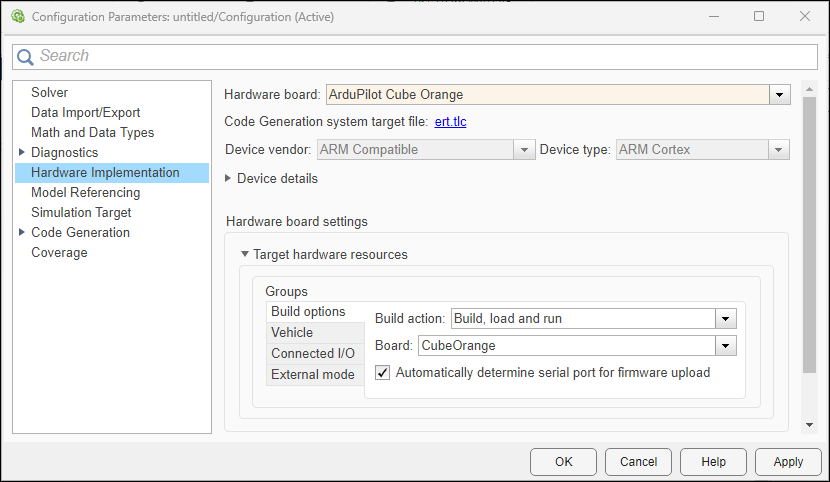
Configure ArduPilot® flight controller to run Simulink models.
In the Simulink Editor, select Simulation > Model Configuration Parameters.
In the Configuration Parameter dialog box, click Hardware Implementation.
Set the Hardware board parameter to one of these, based on the board connected to the host computer:
ArduPilot Cube Blue H7
ArduPilot Cube Orange
ArduPilot Cube Orange +
ArduPilot Generic Board
ArduPilot Host Target
ArduPilot Pixhawk® 4
ArduPilot Pixhawk 6c
ArduPilot Pixhawk 6x
For more information, see Supported ArduPilot Autopilots.
You can also select
ArduPilot Host Targetas the Hardware board to perform only simulation using thejMAVSimsimulator.The parameter values under Hardware board settings are automatically populated to their default values.
You can optionally adjust these parameters for your particular use case.
To apply the changes, click Apply.
For more information on selecting a hardware support package and general configuration settings, see Hardware Implementation Pane (Simulink).
Build Options
| Parameter | Description | Default Value |
|---|---|---|
| Build action |
Option to specify whether you want only the build, or the build, load, and run actions during code generation |
|
| Board | Option to select the board configuration for the selected hardware board. |
|
| Automatically determine serial port for firmware upload | Enables the automatic detection of the serial port for firmware upload, based on the hardware connections Note This parameter does not appear if you select the Hardware board as ArduPilot Host Target. |
on
|
| Serial port for firmware upload | Select the serial port of the host computer for firmware upload Note This parameter does not appear if you select the Hardware board as ArduPilot Host Target. |
|
| Select ArduPilot features to disable for freeing up flash | Select features to disable in order to free up flash memory on the board. |
|
| Camera | Disables camera-related features in the ArduPilot firmware to reduce flash usage. | on |
| Gimbal Mount | Disables gimbal mount control features in the ArduPilot firmware to reduce flash usage. | on |
| DroneCan | Disables DroneCAN protocol support to free up flash memory, if not required for your setup. | off |
| Optical Flow | Disables optical flow sensor support in the firmware, saving flash space if this feature is not used. | off |
| ADSB | Disables Automatic Dependent Surveillance–Broadcast (ADSB) support in the firmware to conserve flash memory. | off |
| EFI | Disables Electronic Fuel Injection (EFI) support in the firmware to free up flash memory. | off |
| Beacon | Disables support for beacon devices in the firmware, reducing flash usage if beacons are not used. | off |
Vehicle
Note
This tab does not appear if you select ArduPilot Host Target as the Hardware board.
| Parameter | Description | Default Value |
|---|---|---|
| ArduPilot Vehicle Type | Indicates which ArduPilot vehicle type (ArduCopter /ArduPlane) is being simulated or selected as the target.. |
off
|
| Change Vehicle Type |
Simulation engine containing the physics for the UAV Dynamics |
ArduCopter
|
| Simulator | Select the simulation environment to run the vehicle model, such as SITL (Software In The Loop) or Simulink in the host target.
Note This parameter appears only if you select the Hardware board as ArduPilot Host Target.
| SITL in Host Target |
| Automatically Detect Host Computer IP Address | Automatically determines the host computer IP address.
Note This parameter appears only if you select the Hardware board as ArduPilot Host Target.
| on |
| Airframe | Select the airframe configuration for the ArduPilot Host Target. | quad |
| Launch MAVProxy Console | Enables the automatic launch of the MAVProxy command-line console for telemetry and control.
Note This parameter appears only if you select the Hardware board as ArduPilot Host Target.
| on |
| Launch MAVProxy Map | Enables the automatic launch of the MAVProxy map interface for visualizing vehicle position and mission planning.
Note This parameter appears only if you select the Hardware board as ArduPilot Host Target.
| on |
Connected I/O
Note
This tab does not appear if you select ArduPilot Pixhawk Series as the Hardware board.
| Parameter | Description | Default Value |
|---|---|---|
| Hardware Board Serial Port | Serial port number on the ArduPilot flight controller board for Connected I/O communication Note This parameter does not appear if you select the Hardware board as ArduPilot Host Target. |
/dev/tty/ACM0
|
| Automatically determine host serial port for Connected I/O | Sets the same host serial port for Connected I/O as the one used for firmware upload Note This parameter does not appear if you select the Hardware board as ArduPilot Host Target. |
on
|
| Host Serial Port | Serial port number on the host computer for External mode communication Note This parameter does not appear if you select ArduPilot Host Target as the Hardware board. |
<empty>
|
External mode
| Parameter | Description | Default Value |
|---|---|---|
| Communication interface | Communication interface that is used to exchange data between host computer and ArduPilot flight controller board. |
|
| ArduPilot board serial port | Sets the same host serial port for External mode as the one used for firmware upload Note This parameter does not appear if you select ArduPilot Host Target as the Hardware board. |
on
|
| Baudrate (bits/sec) | Defines the rate at which data is transferred over CAN network. (in bits/s). | 921600 |
| Automatically determine host serial port for Monitor and Tune simulation | Automatically determines the serial port for firmware upload, based on the hardware connections | on |
| Host Serial Port | Serial port number on the host computer for External mode communication Note This parameter does not appear if you select ArduPilot Host Target as the Hardware board. |
<empty>
|
| Verbose | View External mode execution progress and updates |
on
|
| ArduPilot board serial port | Serial port number on the ArduPilot flight controller board for External mode communication Note This parameter does not appear if you select ArduPilot Host Target as the Hardware board. |
<empty>
|
| Set logging buffer size automatically |
Automatically set the number of bytes to preallocate for the buffer in the hardware during simulation. Note This parameter does not appear if you select ArduPilot Host Target as the Hardware board.
|
|
| Logging buffer size (in bytes) |
Specify the memory buffer size for XCP-based External mode simulation. Note This parameter does not appear if you select ArduPilot Host Target as the Hardware board.
| 1024 |

