XCP CAN FD Transport Layer
R2026bGenerate and consume XCP messages that are transported by CAN FD hardware
Since R2022b
XCP CAN FD Transport Layer block
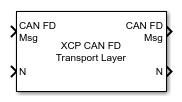
To add a block to a model, double-click the canvas and start typing the block name. Then, select the block from the list.
Libraries:
Simulink Real-Time /
XCP /
CAN FD
Description
The XCP CAN FD Transport Layer block handles CAN FD messages that your model transmits or receives by using Simulink® Real-Time™ CAN FD library blocks.
Connect the input side of the block to a block that receives CAN FD messages. Connect
the output side of the block to a block that transmits the XCP messages over CAN FD. Set
up the transmitting block so that a CAN FD message is sent only when an XCP message is
available. Otherwise, the block sends 0 byte data when XCP messages
are not available, causing undefined behavior.
Ports
Input
Output
Programmatic Use: Add Block
To add the block programmatically, use the add_block function with one of these library block paths as the source.
"xcprtlib/CAN FD/XCP CAN FD Transport Layer"
Example: add_block("xcprtlib/CAN FD/XCP CAN FD Transport Layer","myModel/myBlock",MakeNameUnique="on")
Extended Capabilities
Version History
Introduced in R2022b
See Also
XCP CAN FD Configuration | XCP CAN FD Data Acquisition | XCP CAN FD Data Stimulation

