Active Disturbance Rejection Control
R2026bActive Disturbance Rejection Control block
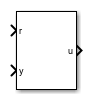
To add a block to a model, double-click the canvas and start typing the block name. Then, select the block from the list.
Libraries:
Simulink Control Design /
Adaptive Control
Description
The Active Disturbance Rejection Control block lets you design active disturbance rejection control (ADRC) for a plant with unknown dynamics and internal and external disturbances. ADRC is a model-free control technique that requires only an approximation of the plant dynamics to design controllers that provide robust disturbance rejection.
The block uses a first-order or second-order model approximation of the known system dynamics along with the unknown dynamics and disturbances modeled as an extended state of the plant. Typically, you determine this order from the open-loop step response of your plant in the operating range.
First-order approximation —
Second-order approximation —
Here:
y(t) is the plant output.
u(t) is the input signal.
b0 is the critical gain, which is the estimated gain that describes the plant response to an input u(t).
f(t) is the total disturbance, which includes unknown dynamics and other disturbances.
The block uses an extended state observer (ESO) to estimate f(t) and implements disturbance rejection control by reducing the effect of estimated disturbances on the known part of model approximation. To tune ADRC, set appropriate time domain, model type and critical gain, controller and observer bandwidths, and initial conditions.
For more information, see Active Disturbance Rejection Control.
Examples
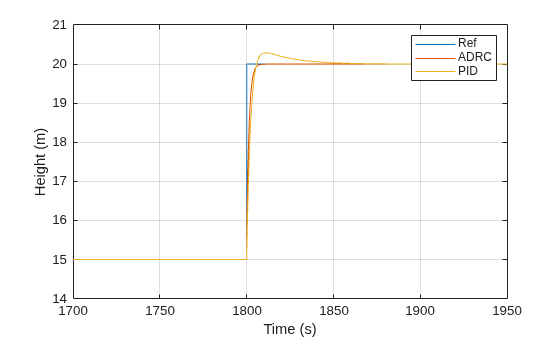
Design Active Disturbance Rejection Control for Water-Tank System
Design ADRC for a water-tank model and compare performance against a gain-scheduled PID controller.
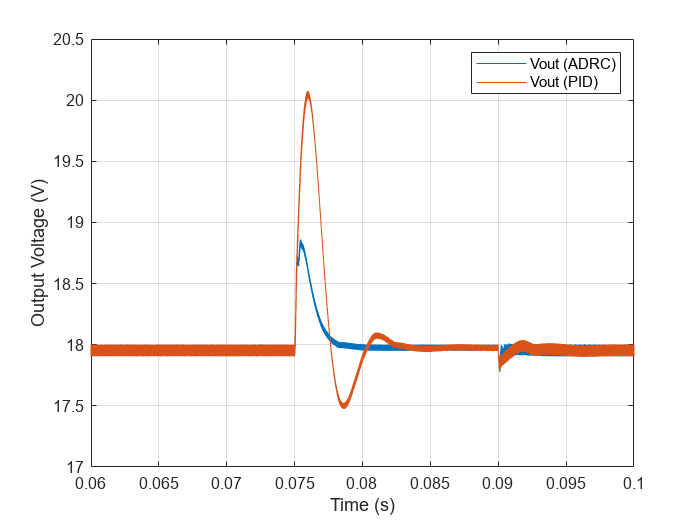
Design Active Disturbance Rejection Control for Boost Converter
Design ADRC for a boost converter model and compare performance against a PID controller tuned on a linearized model.
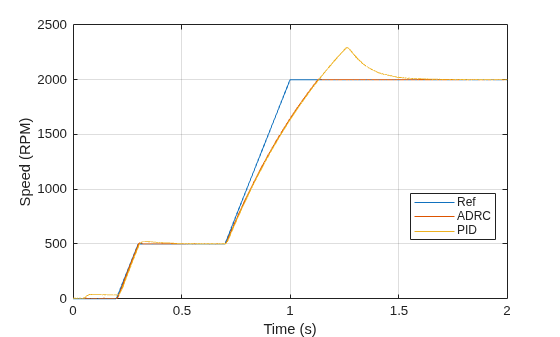
Design Active Disturbance Rejection Control for BLDC Speed Control Using PWM
Design ADRC for a brushless DC motor speed controller using pulse width modulation.
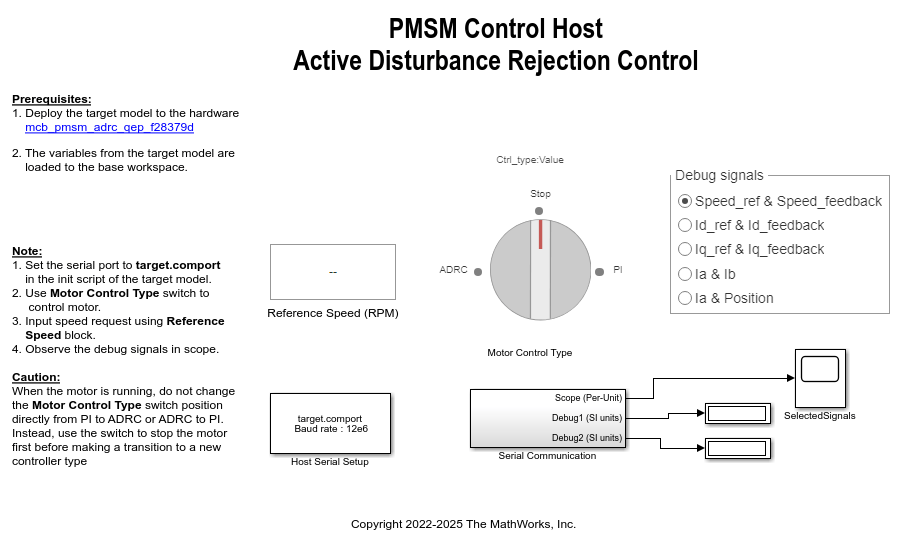
Implement PMSM Speed Control Using Active Disturbance Rejection Control
Implement active disturbance rejection control (ADRC) of the speed of a permanent magnet synchronous motor (PMSM) modeled in Simulink® using the Active Disturbance Rejection Control block. You can use the example to implement field-oriented control (FOC) using either a proportional integral (PI) or ADRC-based controller to run the motor in the speed control mode. Therefore, you can compare the performance of the PI and ADRC controllers.
(Motor Control Blockset)
Ports
Input
Provide the reference signal for the controlled system to follow.
Since R2026b
Connect this port to the external control signal from an existing controller. The block uses this signal to facilitate a bumpless transfer from the existing controller to the ADRC controller.
Dependencies
To enable this input port, set the Tracking
mode parameter to track external control
signal or reset observer
state.
Since R2026b
To enable the ESO, set this signal to a positive value. Otherwise, the ESO is disabled.
Dependencies
To enable this input port, set the Tracking
mode parameter to reset observer
state.
Since R2026b
Supply the derivative of the plant output signal directly as an input to the block.
Dependencies
To enable this input port, set the Tracking
mode parameter to reset observer
state and set the Model type
parameter to second-order. You must also select
use external source for the observer state feedback time constant
parameter.
Output
Connect the control input signal to the plant input.
Estimated extended states of the plant model from the extended state observer.
If the Model type is first-order, xhat is a vector of length two, with estimated states and .
If the Model type is second-order, xhat is a vector of length three, with estimated states , , and .
Dependencies
To enable this output port, select the Estimated extended states parameter.
Parameters
Parameters Tab
Specify the controller time domain.
When you select discrete-time, specify the sample time using the Sample time parameter.
Programmatic Use
To set the block parameter value programmatically, use
the set_param function.
| Parameter: | time_domain |
| Values: | "discrete-time" (default) | "continuous-time" |
Specify the sample time value for the discrete-time controller.
Dependencies
To enable this parameter, set the Time domain parameter to discrete-time.
Programmatic Use
To set the block parameter value programmatically, use
the set_param function.
| Parameter: | Ts |
| Values: | "0.01" (default) | finite positive scalar in quotes |
Specify the model type of your plant as one of the following.
first-order — Select this option if your plant exhibits first-order dynamic system behavior.
second-order — Select this option if your plant exhibits second-order dynamic system behavior.
Programmatic Use
To set the block parameter value programmatically, use
the set_param function.
| Parameter: | model_type |
| Values: | "first-order" (default) | "second-order" |
Programmatic Use
Block Parameter:
'model_type' |
| Type: character vector |
Values:
'first-order' |
'second-order' |
Default:
'first-order' |
Specify the critical gain b0 that describes the model behavior.
Programmatic Use
To set the block parameter value programmatically, use
the set_param function.
| Parameter: | b0 |
| Values: | "1" (default) | finite nonzero scalar in quotes |
Specify the controller bandwidth. This parameter determines the speed of the controller response. In general, a faster response requires a larger controller bandwidth.
Programmatic Use
To set the block parameter value programmatically, use
the set_param function.
| Parameter: | wc |
| Values: | "1" (default) | finite positive scalar in quotes |
Specify the observer bandwidth. Typically, this is set to 5 to 10 times the controller bandwidth so that the observer converges faster than the controller.
Programmatic Use
To set the block parameter value programmatically, use
the set_param function.
| Parameter: | wo |
| Values: | "10" (default) | finite positive scalar in quotes |
Block Tab
Specify the initial state values for extended state observer as a scalar or vector of length n.
If Model type is first-order, n = 2. Otherwise, n = 3.
Programmatic Use
To set the block parameter value programmatically, use
the set_param function.
| Parameter: | x0 |
| Values: | "0" (default) | finite scalar in quotes | vector in quotes |
Option to limit block output to specified saturation limits. Specify the output saturation limits using the Upper limit and Lower limit parameters.
Programmatic Use
To set the block parameter value programmatically, use
the set_param function.
| Parameter: | ulim_checkbox |
| Values: | "off" (default) | "on" |
Specify the upper limit for the block output. The block output is held at this value whenever it would otherwise exceed this value.
Dependencies
To enable this parameter, select the Limit output parameter.
Programmatic Use
To set the block parameter value programmatically, use
the set_param function.
| Parameter: | umax |
| Values: | "inf" (default) | scalar in quotes |
Specify the lower limit for the block output. The block output is held at this value whenever it would otherwise go below this value.
Dependencies
To enable this parameter, select the Limit output parameter.
Programmatic Use
To set the block parameter value programmatically, use
the set_param function.
| Parameter: | umin |
| Values: | "-inf" (default) | scalar in quotes |
Since R2026b
Tracking mode for bumpless transfer, specified as one of these values.
none— Do not perform tracking and do not perform a bumpless transfer.track external control signal— Continuously run the extended state observer to estimate the states and track the control signal to ensure a bumpless transfer. Selecting this option enables the TR input port.reset observer state— Initialize the extended state observer based on the measured process output using an external reset signal before performing a bumpless transfer. Selecting this option:Selecting this option enables the TR and enable input ports
If the Model type parameter is second-order, then selecting this option enables the observer state feedback time constant parameter.
The Active Disturbance Rejection Control block does not initiate the controller transfer itself. You must perform the transfer externally within your model.
For both bumpless transfer modes, the Active Distrubance Rejection Control block gradually transitions from the existing controller output signal to the ADRC output signal.
Programmatic Use
To set the block parameter value programmatically, use
the set_param function.
| Parameter: | umin |
| Values: | "none" (default) | "track external control
signal" | "reset observer state" |
Since R2026b
Time constant for second-order state feedback, specified as a positive scalar.
Dependencies
To enable this parameter, set the Tracking
mode parameter to reset observer
state and set the Model type
parameter to second-order.
Instead of providing a state feedback time constant, you can supply the derivative of the plant output as an input to the block. To do so, select use external source. which adds the ydot input port.
Programmatic Use
To set the block parameter value programmatically, use
the set_param function.
| Parameter: | FilterTimeConstant |
| Values: | "0.01" (default) | positive scalar in quotes |
| Parameter: | UseExternalDerivative |
| Values: | "off" (default) | "on" |
Option to output states from the extended state observer.
If the Model type is first-order, the block outputs and .
If the Model type is second-order, the block outputs , , and .
Programmatic Use
To set the block parameter value programmatically, use
the set_param function.
| Parameter: | xhat_checkbox |
| Values: | "off" (default) | "on" |
Extended Capabilities
C/C++ Code Generation
Generate C and C++ code using Simulink® Coder™.
Version History
Introduced in R2022bYou can now perform a bumpless transfer from an existing controller, such as a PID controller, to an Active Disturbance Rejection Control block. To do so, use the Tracking mode parameter.
The Active Disturbance Rejection Control block does not initiate the controller transfer itself. You must perform the transfer externally within your model. When you do, the block gradually transitions from the existing controller output signal to the ADRC output signal.
The Active Disturbance Rejection Control block is now in the Simulink Control Design/Adaptive Control sublibrary.
In R2023b, when you open a model saved in a previous release, the library links for Active Disturbance Rejection Control blocks update automatically.
See Also
MATLAB Command
You clicked a link that corresponds to this MATLAB command:
Run the command by entering it in the MATLAB Command Window. Web browsers do not support MATLAB commands.
Select a Web Site
Choose a web site to get translated content where available and see local events and offers. Based on your location, we recommend that you select: .
You can also select a web site from the following list
How to Get Best Site Performance
Select the China site (in Chinese or English) for best site performance. Other MathWorks country sites are not optimized for visits from your location.
Americas
- América Latina (Español)
- Canada (English)
- United States (English)
Europe
- Belgium (English)
- Denmark (English)
- Deutschland (Deutsch)
- España (Español)
- Finland (English)
- France (Français)
- Ireland (English)
- Italia (Italiano)
- Luxembourg (English)
- Netherlands (English)
- Norway (English)
- Österreich (Deutsch)
- Portugal (English)
- Sweden (English)
- Switzerland
- United Kingdom (English)


