Quantizer
R2026bDiscretize input at given interval
Quantizer block

To add a block to a model, double-click the canvas and start typing the block name. Then, select the block from the list.
Libraries:
Simulink /
Discontinuities
DSP System Toolbox /
Quantizers
Description
The Quantizer block discretizes the input signal using a quantization algorithm. The block uses a round-to-nearest method to map signal values to quantized values at the output that are defined by the Quantization interval. A smooth input signal can take on a stair-step shape after quantization.
This equation mathematically describes the round-to-nearest method:
y = q * round(u/q)
where y is the quantized output, u is the input, and
q is the Quantization interval.
Examples
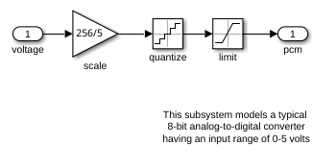
This example shows how the Quantizer and Saturation blocks are used in the model ex_sldemo_boiler. The ADC subsystem digitizes the input analog voltage by:
Multiplying the analog voltage by 256/5 with the Gain block
Rounding the value to integer floor with the Quantizer block
Limiting the output to a maximum of 255 (the largest unsigned 8-bit integer value) with the Saturation block
Ports
Input
Output
Parameters
Block Characteristics
Data Types |
|
Direct Feedthrough |
|
Multidimensional Signals |
|
Variable-Size Signals |
|
Zero-Crossing Detection |
|
Programmatic Use: Add Block
To add the block programmatically, use the add_block function with one of these library block paths as the source.
"simulink/Discontinuities/Quantizer"
"dspquant2/Quantizer"
Example: add_block("simulink/Discontinuities/Quantizer","myModel/myBlock",MakeNameUnique="on")
For information about programmatic access to individual block parameters, see the Programmatic Use section of parameter descriptions on this page.
Extended Capabilities
Version History
Introduced before R2006a

