Voltage Sensor
R2026bVoltage sensor in electrical systems
Voltage Sensor block

To add a block to a model, double-click the canvas and start typing the block name. Then, select the block from the list.
Libraries:
Simscape /
Foundation Library /
Electrical /
Electrical Sensors
Simscape /
Electrical /
Sensors & Transducers
Description
The Voltage Sensor block represents an ideal voltage sensor, that is, a device that converts voltage measured between two points of an electrical circuit into a physical signal proportional to the voltage.
Use the + and - ports to connect the sensor in parallel with the block (or several blocks) where you want to measure the voltage. Port V outputs the measurement result as a physical signal. Use a PS-Simulink Converter block to connect this port to Simulink® blocks, such as Scope or Display.
Examples
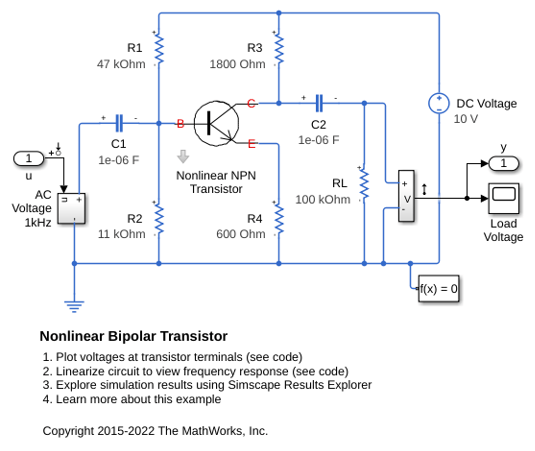
Nonlinear Bipolar Transistor
An implementation of a nonlinear bipolar transistor based on the Ebers-Moll equivalent circuit. R1 and R2 set the nominal operating point, and the small signal gain is approximately set by the ratio R3/R4. The 1uF decoupling capacitors have been chosen to present negligible impedance at 1KHz. The model is configured for linearization so that a frequency response can be generated.
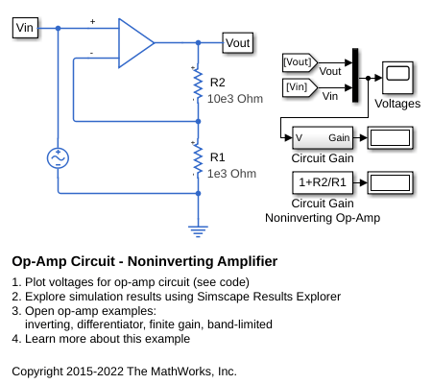
Op-Amp Circuit - Noninverting Amplifier
A noninverting op-amp circuit. The gain is given by 1+R2/R1, and with the values set to R1=1K Ohm and R2=10K Ohm, the 0.1V peak-to-peak input voltage is amplified to 1.1V peak-to-peak. As the Op-Amp block implements an ideal (i.e. infinite gain) device, this gain is achieved regardless of output load.
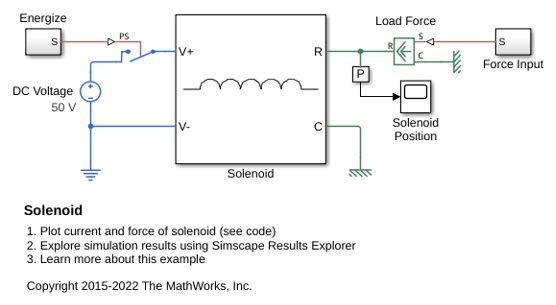
Solenoid
A solenoid with a spring return. The solenoid is modeled as an inductance whose value L depends on the plunger position x. The back emf for a time-varying inductance is given by:
Ports
Output
Conserving
Programmatic Use: Add Block
To add the block programmatically, use the add_block function with one of these library block paths as the source.
"fl_lib/Electrical/Electrical Sensors/Voltage Sensor"
"ee_lib/Sensors & Transducers/Voltage Sensor"
Example: add_block("fl_lib/Electrical/Electrical Sensors/Voltage Sensor","myModel/myBlock",MakeNameUnique="on")
For information about programmatic access to individual block parameters, see the Programmatic Use section of parameter descriptions on this page.
Extended Capabilities
Version History
Introduced in R2007a

