Check Rigid Body Tree Trajectories for Collisions in Simulink
This example shows how to check the self and world collisions of a rigid body tree given an input trajectory in Simulink® with dynamic world obstacles. This process is useful when you need to plan trajectories that can respond to potential collisions in a dynamic environment. Additionally, such processes are useful when you have a perception subsystem that provides the dimensions and poses of geometries in the environment of the rigid body tree.
Model Overview
The model checks collisions for each joint configuration in a rigid body tree joint trajectory in the presence of collision geometries in the environment of the rigid body tree. The dimensions and poses of the collision geometries change with each time step. The model consists of these components.
Specify Rigid Body Tree — This section uses the Rigid Body Tree block to create a rigid body tree robot model to check for self and world collisions.
Specify Trajectory Of Rigid Body Tree — The blocks in this section specify a trajectory for the rigid body tree. For this example, this trajectory is constant at each time step.
Specify Dynamic World Objects — The blocks in this section specify an array of collision geometries as obstacles in the world. These collision geometries change in dimension and pose at each time step during run time.
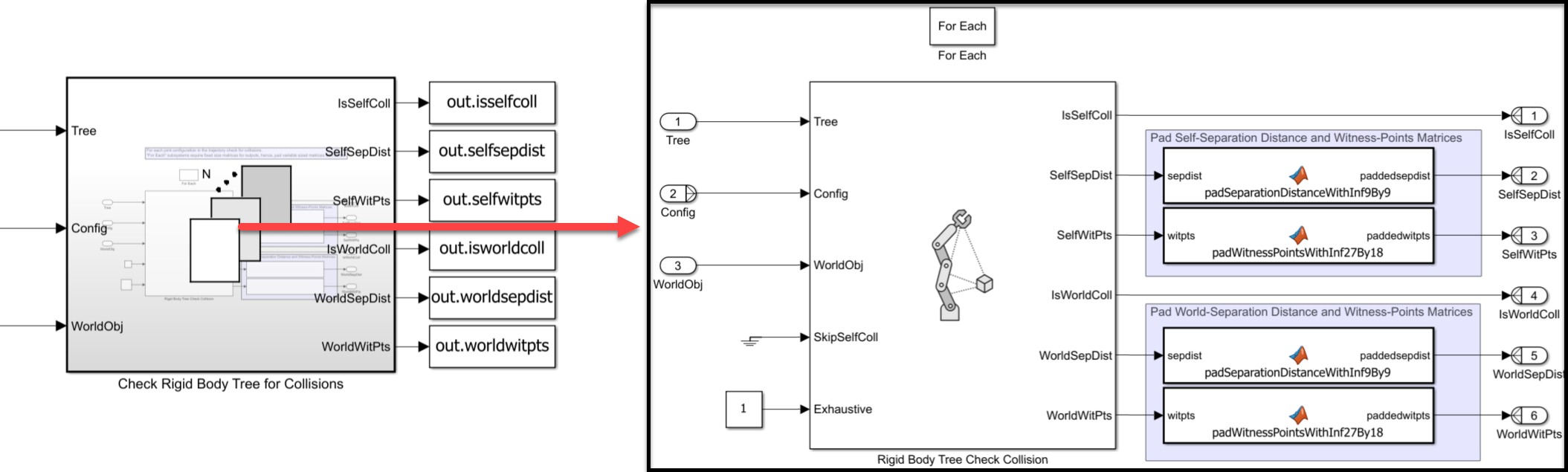
Check Rigid Body Tree for Collisions — This For Each Subsystem outputs the separation distance and witness points for self and world collisions for each joint configuration in the trajectory.
Open the model.
sysname = "checkrbttrajmdl";
open_system(sysname)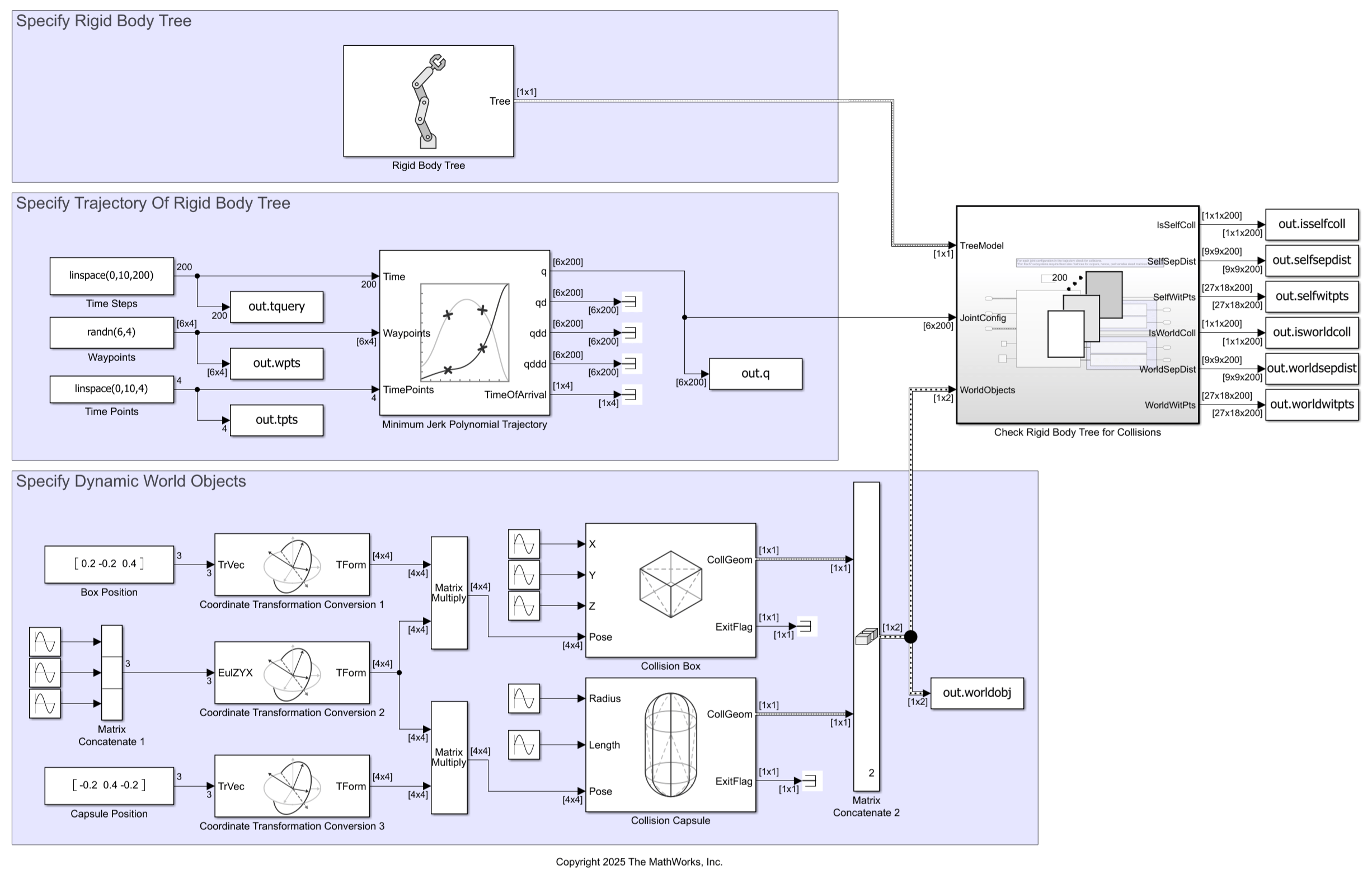
Specify Rigid Body Tree
This model loads the rigid body tree robot model for the ABB IRB 120 robot from the Robot Library using the Rigid Body Tree block. Note that the Rigid Body Tree block outputs a Simulink bus. See the Tree output port of the Rigid Body Tree block page for more information.
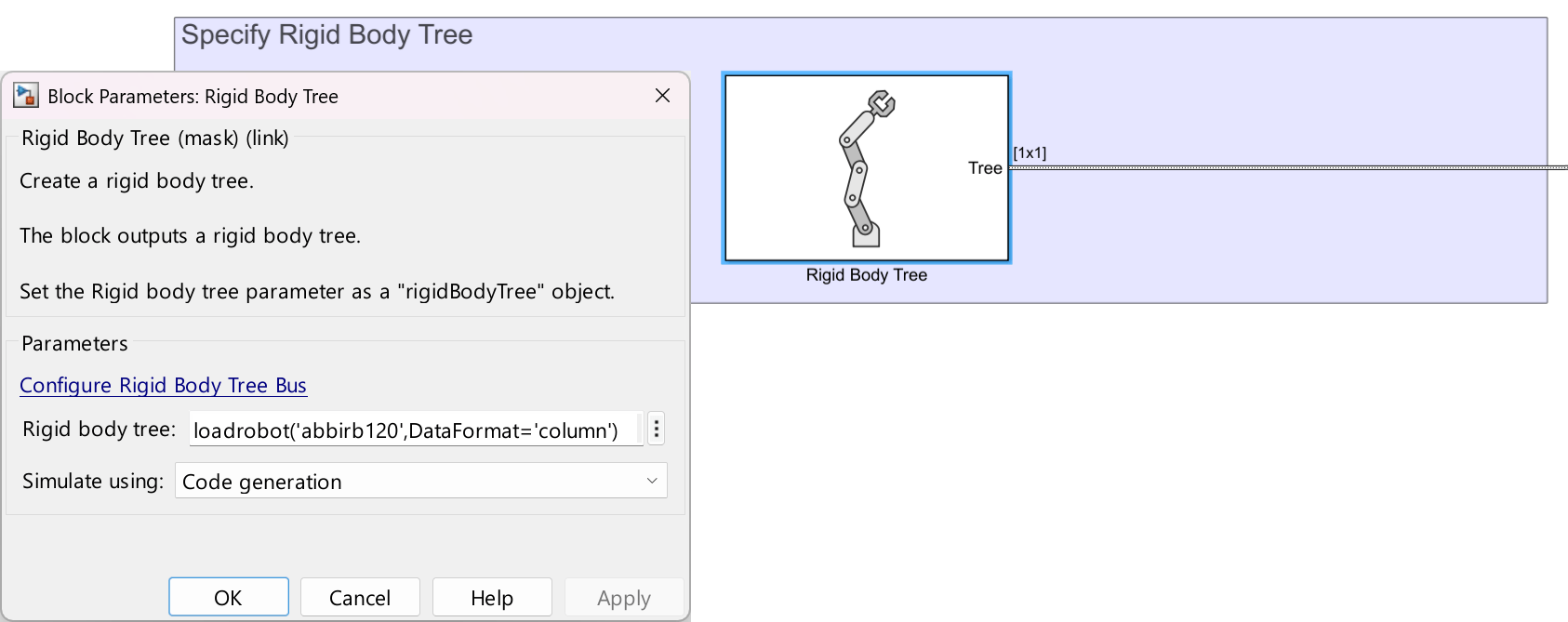
For later visualization, get the robot model from the Rigid Body Tree block to MATLAB®.
abbirb = eval(get_param(sysname+"/Rigid Body Tree","RigidBodyTree"));
Specify Trajectory of Rigid Body Tree
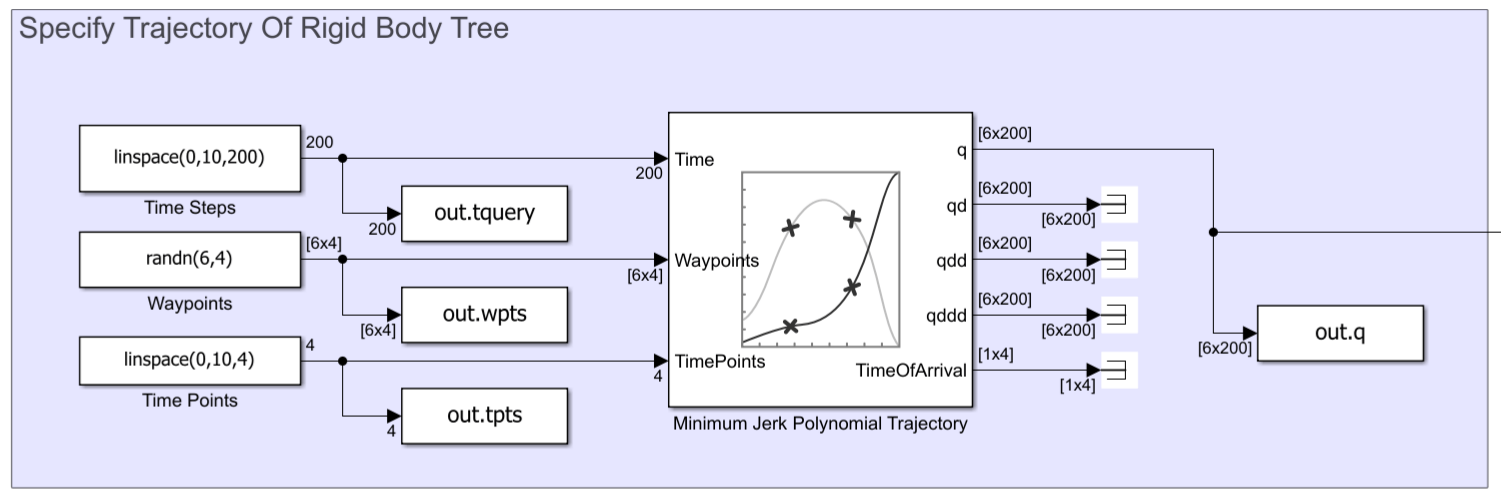
The Specify Trajectory of Rigid Body Tree section uses a minimum jerk polynomial trajectory to generate a motion that causes the robot to collide with the environment and itself, for demonstration. Note that, in this case, the trajectory is constant for all time steps. However, for planning collision-free trajectories, you can design the trajectory generation to update during run time based on collision information.
Specify Dynamic World Objects
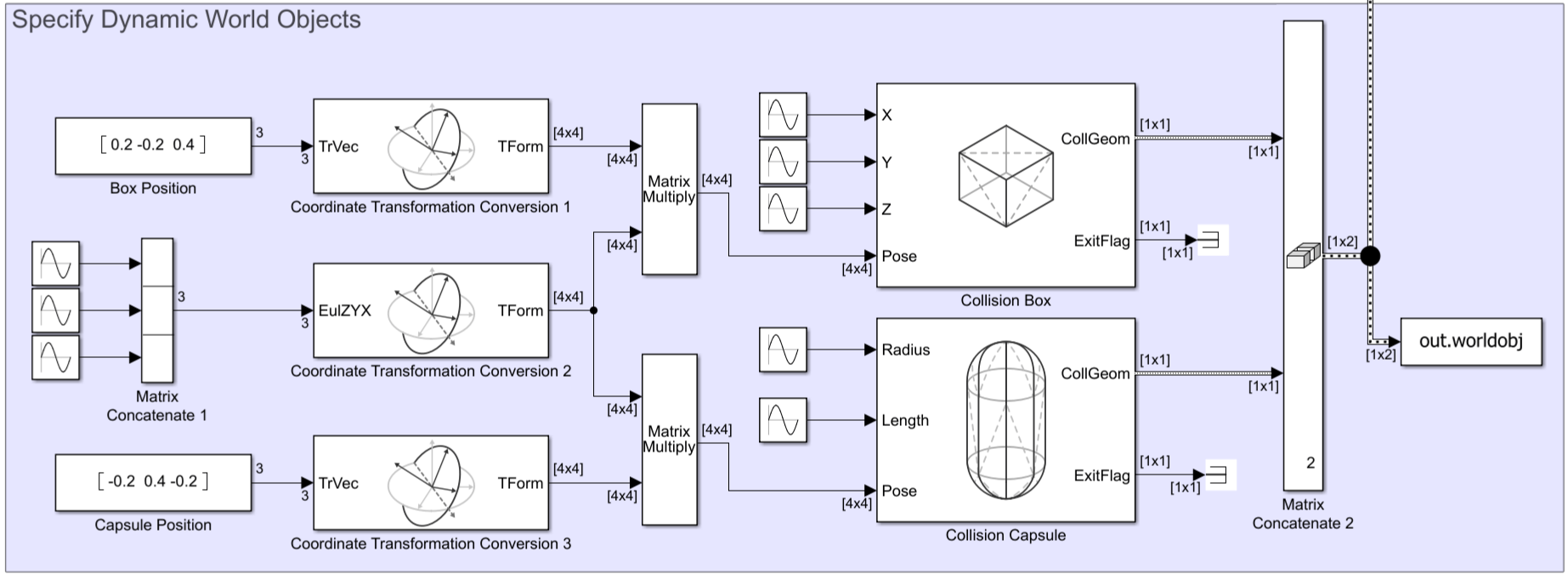
The Specify Dynamic World Objects section creates two collision geometries, a capsule and a box, in the surroundings of the rigid body tree. To demonstrate a dynamic environment, the model modifies the dimensions and pose of these collision geometries during run time using sine waves. The model concatenates the collision geometries into one bus to represent the environment to specify to the Rigid Body Tree Check Collision block.
Check Rigid Body Tree Collision for Each Configuration
The For Each Subsystem Check Rigid Body Tree for Collisions, takes the rigid body tree, the joint configuration trajectory, and collision environment from the other sections of the model and inputs those into the Rigid Body Tree Check Collision block to compute the self and world separation distances and witness points for each joint configuration in the trajectory.
Note that a For Each Subsystem requires fixed-size output signals. Because the output separation distance and witness point matrices are variable-sized due to the number of rigid bodies in the input rigid body tree, the For Each Subsystem uses MATLAB Function blocks to pad the variable-sized output signals so that the output signals are fixed-size.
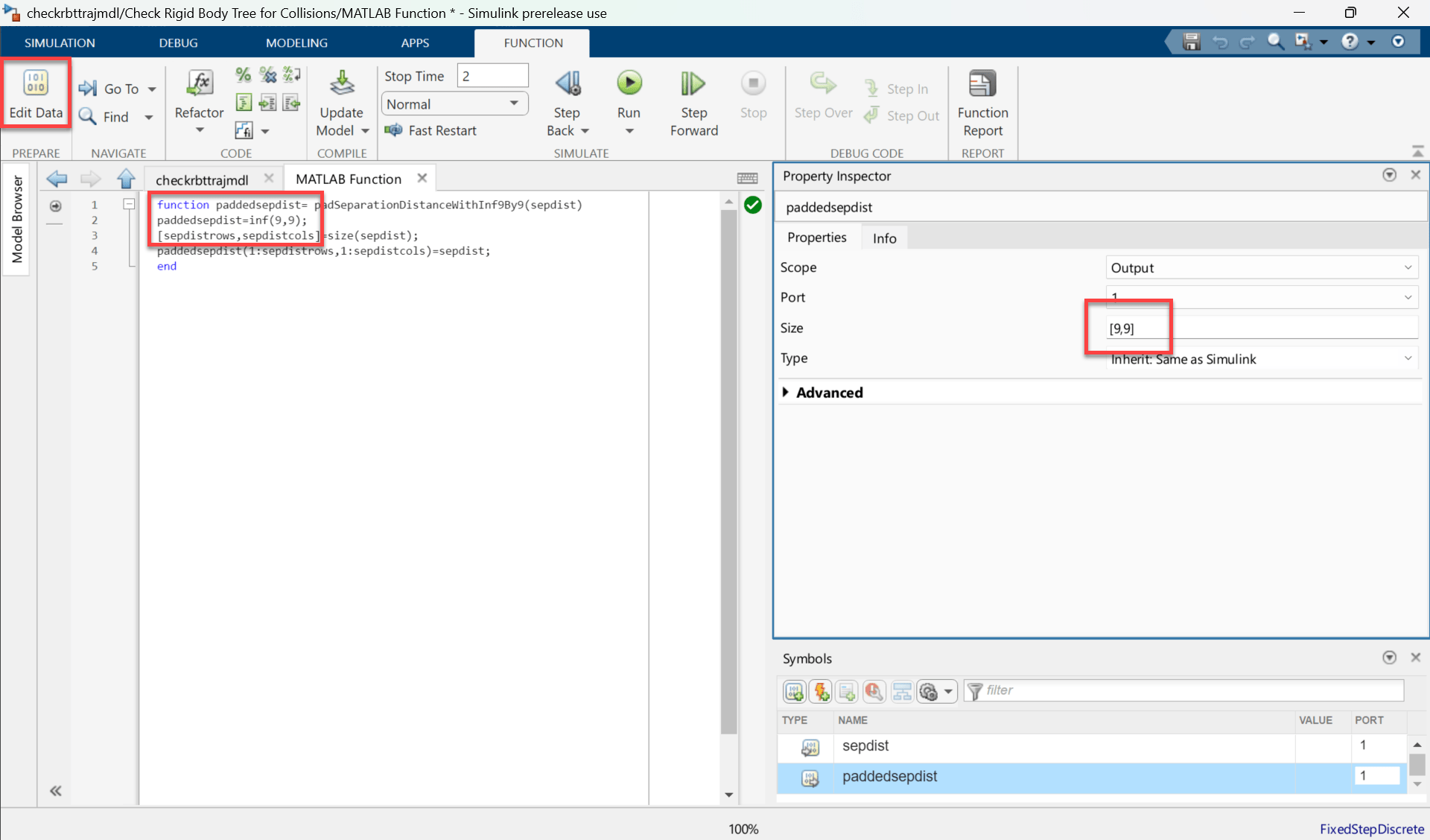
The MATLAB Function blocks that pad the signals assume that the rigid body tree has a maximum of nine bodies, and that the environment contains a maximum number of nine world objects. To use a different rigid body tree model with more than nine rigid bodies, or to increase the number of world objects in the environment, you can edit the parameters of these MATLAB Function blocks. To do so, open the MATLAB Function block you want to edit and click Edit Data. For instance, this screenshot shows that the paddedsepdist function for self-collision queries has a fixed size of [9,9].
Simulate and Visualize Collision Queries
Simulate the model and visualize the simulation outputs. This example uses random waypoints in the joint configuration space of the rigid body tree. Specify the seed for the random number generator before running the simulation to ensure repeatable results.
rng(67)
simout = sim(sysname);
### Building simulation target for model: 'checkrbttrajmdl'.
/mathworks/devel/bat/filer/batfs2566-0/Bdoc26a.3233028/build/runnable/matlab/bin/mex -R2018a -c -DMATLAB_MEX_FILE -I"/mathworks/devel/bat/filer/batfs2566-0/Bdoc26a.3233028/build/runnable/matlab/extern/include" -I"/mathworks/devel/bat/filer/batfs2566-0/Bdoc26a.3233028/build/runnable/matlab/simulink/include" -I"/mathworks/devel/bat/filer/batfs2566-0/Bdoc26a.3233028/build/runnable/matlab/rtw/c/src" -I"/tmp/Bdoc26a_3233028_1679788/tpe812315a/robotics-ex34743311" -I"/tmp/Bdoc26a_3233028_1679788/tpe812315a/robotics-ex34743311/slprj/_cprj"  -I"/tmp/Bdoc26a_3233028_1679788/tpe812315a/robotics-ex34743311/slprj/_cgxe/checkrbttrajmdl/src" -I"/mathworks/devel/bat/filer/batfs2566-0/Bdoc26a.3233028/build/runnable/matlab/extern/include/shared_robotics" -I"/mathworks/devel/bat/filer/batfs2566-0/Bdoc26a.3233028/build/runnable/matlab/extern/include/shared_robotics/collfcncodegen" -I"/mathworks/devel/bat/filer/batfs2566-0/Bdoc26a.3233028/build/runnable/matlab/toolbox/shared/robotics/externalDependency/libccd/src" -I"/mathworks/devel/bat/filer/batfs2566-0/Bdoc26a.3233028/build/runnable/matlab/toolbox/shared/robotics/externalDependency/libccd/src/ccd"  CFLAGS="\$CFLAGS -w   -Dccd_EXPORTS" checkrbttrajmdl_cgxe.c
Building with 'gcc'.
MEX completed successfully.
/mathworks/devel/bat/filer/batfs2566-0/Bdoc26a.3233028/build/runnable/matlab/bin/mex -R2018a -c -DMATLAB_MEX_FILE -I"/mathworks/devel/bat/filer/batfs2566-0/Bdoc26a.3233028/build/runnable/matlab/extern/include" -I"/mathworks/devel/bat/filer/batfs2566-0/Bdoc26a.3233028/build/runnable/matlab/simulink/include" -I"/mathworks/devel/bat/filer/batfs2566-0/Bdoc26a.3233028/build/runnable/matlab/rtw/c/src" -I"/tmp/Bdoc26a_3233028_1679788/tpe812315a/robotics-ex34743311" -I"/tmp/Bdoc26a_3233028_1679788/tpe812315a/robotics-ex34743311/slprj/_cprj"  -I"/tmp/Bdoc26a_3233028_1679788/tpe812315a/robotics-ex34743311/slprj/_cgxe/checkrbttrajmdl/src" -I"/mathworks/devel/bat/filer/batfs2566-0/Bdoc26a.3233028/build/runnable/matlab/extern/include/shared_robotics" -I"/mathworks/devel/bat/filer/batfs2566-0/Bdoc26a.3233028/build/runnable/matlab/extern/include/shared_robotics/collfcncodegen" -I"/mathworks/devel/bat/filer/batfs2566-0/Bdoc26a.3233028/build/runnable/matlab/toolbox/shared/robotics/externalDependency/libccd/src" -I"/mathworks/devel/bat/filer/batfs2566-0/Bdoc26a.3233028/build/runnable/matlab/toolbox/shared/robotics/externalDependency/libccd/src/ccd"  CFLAGS="\$CFLAGS -w   -Dccd_EXPORTS" checkrbttrajmdl_cgxe_registry.c
Building with 'gcc'.
MEX completed successfully.
/mathworks/devel/bat/filer/batfs2566-0/Bdoc26a.3233028/build/runnable/matlab/bin/mex -R2018a -c -DMATLAB_MEX_FILE -I"/mathworks/devel/bat/filer/batfs2566-0/Bdoc26a.3233028/build/runnable/matlab/extern/include" -I"/mathworks/devel/bat/filer/batfs2566-0/Bdoc26a.3233028/build/runnable/matlab/simulink/include" -I"/mathworks/devel/bat/filer/batfs2566-0/Bdoc26a.3233028/build/runnable/matlab/rtw/c/src" -I"/tmp/Bdoc26a_3233028_1679788/tpe812315a/robotics-ex34743311" -I"/tmp/Bdoc26a_3233028_1679788/tpe812315a/robotics-ex34743311/slprj/_cprj"  -I"/tmp/Bdoc26a_3233028_1679788/tpe812315a/robotics-ex34743311/slprj/_cgxe/checkrbttrajmdl/src" -I"/mathworks/devel/bat/filer/batfs2566-0/Bdoc26a.3233028/build/runnable/matlab/extern/include/shared_robotics" -I"/mathworks/devel/bat/filer/batfs2566-0/Bdoc26a.3233028/build/runnable/matlab/extern/include/shared_robotics/collfcncodegen" -I"/mathworks/devel/bat/filer/batfs2566-0/Bdoc26a.3233028/build/runnable/matlab/toolbox/shared/robotics/externalDependency/libccd/src" -I"/mathworks/devel/bat/filer/batfs2566-0/Bdoc26a.3233028/build/runnable/matlab/toolbox/shared/robotics/externalDependency/libccd/src/ccd"  CFLAGS="\$CFLAGS -w   -Dccd_EXPORTS" m_JGX29JHnyd5IW0apftpm3.c
Building with 'gcc'.
/tmp/Bdoc26a_3233028_1679788/tpe812315a/robotics-ex34743311/slprj/_cgxe/checkrbttrajmdl/src/m_JGX29JHnyd5IW0apftpm3.c: In function ‘CollisionGeometryBuildableFunctional_intersect’:
/tmp/Bdoc26a_3233028_1679788/tpe812315a/robotics-ex34743311/slprj/_cgxe/checkrbttrajmdl/src/m_JGX29JHnyd5IW0apftpm3.c:5011:22: error: passing argument 16 of ‘fromMLToCollStruct’ from incompatible pointer type [-Wincompatible-pointer-types]
 5011 |                      &geom1struct.m_Vertices, &geom1struct.m_NumVertices,
      |                      ^~~~~~~~~~~~~~~~~~~~~~~
      |                      |
      |                      const real64_T ** {aka const double **}
/tmp/Bdoc26a_3233028_1679788/tpe812315a/robotics-ex34743311/slprj/_cgxe/checkrbttrajmdl/src/m_JGX29JHnyd5IW0apftpm3.c:1526:43: note: expected ‘real64_T **’ {aka ‘double **’} but argument is of type ‘const real64_T **’ {aka ‘const double **’}
 1526 |   real_T *geomstruct_m_Height, real64_T* *geomstruct_m_Vertices, uint32_T
      |                                ~~~~~~~~~~~^~~~~~~~~~~~~~~~~~~~~
/tmp/Bdoc26a_3233028_1679788/tpe812315a/robotics-ex34743311/slprj/_cgxe/checkrbttrajmdl/src/m_JGX29JHnyd5IW0apftpm3.c:5018:22: error: passing argument 16 of ‘fromMLToCollStruct’ from incompatible pointer type [-Wincompatible-pointer-types]
 5018 |                      &geom2struct.m_Vertices, &geom2struct.m_NumVertices,
      |                      ^~~~~~~~~~~~~~~~~~~~~~~
      |                      |
      |                      const real64_T ** {aka const double **}
/tmp/Bdoc26a_3233028_1679788/tpe812315a/robotics-ex34743311/slprj/_cgxe/checkrbttrajmdl/src/m_JGX29JHnyd5IW0apftpm3.c:1526:43: note: expected ‘real64_T **’ {aka ‘double **’} but argument is of type ‘const real64_T **’ {aka ‘const double **’}
 1526 |   real_T *geomstruct_m_Height, real64_T* *geomstruct_m_Vertices, uint32_T
      |                                ~~~~~~~~~~~^~~~~~~~~~~~~~~~~~~~~

gmake: *** [m_JGX29JHnyd5IW0apftpm3.o] Error 255


### Build procedure for model: 'checkrbttrajmdl' aborted due to an error.
Get the simulation output data for the fifth time step. Extract the current joint configuration, the self and world witness points, the self and world separation distances, the self and world collision statuses, and the world objects from the simulation output.
tt = 5;

% Current joint configuration
q_t = simout.q.Data(:,:,tt);

% Witness points
selfwitpts_t = simout.selfwitpts.Data(:,:,:,tt);
worldwitpts_t = simout.worldwitpts.Data(:,:,:,tt);

% Separation distances
selfsepdist_t = simout.selfsepdist.Data(:,:,:,tt);
worldsepdist_t = simout.worldsepdist.Data(:,:,:,tt);

% Collision status
isselfcoll_t = simout.isselfcoll.Data(:,:,tt);
isworldcoll_t = simout.isworldcoll.Data(:,:,tt);

% World object info
worldobj = simout.worldobj;
For each world object, create a corresponding collision geometry object with corresponding dimensions and pose in MATLAB for visualization.
cboxout = worldobj(1);
ccapout = worldobj(2);
cbox = collisionBox(cboxout.m_X.Data(:,:,tt), ...
                    cboxout.m_Y.Data(:,:,tt), ...
                    cboxout.m_Z.Data(:,:,tt), ...
                    Pose=trvec2tform(cboxout.m_Position.Data(:,:,tt)) ...
                    *quat2tform(cboxout.m_Quaternion.Data(:,:,tt)));
ccap = collisionCapsule(ccapout.m_Radius.Data(:,:,tt), ...
                        ccapout.m_Height.Data(:,:,tt), ...
                        Pose=trvec2tform(ccapout.m_Position.Data(:,:,tt)) ...
                        *quat2tform(ccapout.m_Quaternion.Data(:,:,tt)));
Visualize the geometries.
[ax,collpatches] = showCollisionArray({cbox,ccap});
axis auto
hold on
Plot three lines. This example updates these lines to correspond to the separation vectors between a body and various collision geometries:
Between body 7 and the collision box
Between body 7 and the collision capsule
Between body 7 and the base of the rigid body tree
lbody7box = plot3([0 0],[0 0],[0 0],LineWidth=4,Marker="*",MarkerSize=11);
lbody7cap = plot3([0 0],[0 0],[0 0],LineWidth=4,Marker="*",MarkerSize=11);
lbody7base = plot3([0 0],[0 0],[0 0],LineWidth=4,Marker="*",MarkerSize=11);
For each joint configuration in the trajectory:
Visualize the rigid body tree at the current joint configuration together with the collision geometries.
Extract witness points and separation distances for world and self collision.
Identify body-to-world object and body-to-body pairs in collision by checking
NaNvalues in the separation distance matrices.Highlight the colliding bodies in the rigid body tree and world objects.
Plot separation vectors for the selected body using witness points.
title(["Trajectory Animation with","Witness Point Lines"])
rc = rateControl(60); % Update visualization at 60Hz
for ii = 1:size(q_t,2)

    % Step 1: Visualize the rigid body tree at current joint configuration
    show(abbirb,q_t(:,ii), ...
        Collisions="on", ...
        Visuals="on", ...
        PreservePlot=false, ...
        FastUpdate=true, ...
        Parent=ax, ...
        Frames="off", ...
        DisplayBodyDetails="off");
    bidx = 7; % End-effector body index

    % Step 2: Extract witness points and separation distances for this configuration
    worldwitpts_t_ii = worldwitpts_t(:,:,ii);
    selfwitpts_t_ii = selfwitpts_t(:,:,ii);
    worldsepdist_t_ii = worldsepdist_t(:,:,ii);
    selfsepdist_t_ii = selfsepdist_t(:,:,ii);

    % Step 3: Find colliding pairs (NaN separation distances)
    [rworld,cworld] = find(isnan(worldsepdist_t_ii));
    [rself,cself] = find(isnan(selfsepdist_t_ii));
    rcself = unique(sort([rself cself],2),"rows");
    rcworld = unique([rworld cworld],"rows");

    % Step 4: Highlight colliding bodies in tree and world
    exampleHelperVisualizeCollidingBodyInTree(abbirb,unique(rcworld(:,1)),ax);
    set(collpatches,FaceColor=ax.ColorOrder(6,:));
    set(collpatches(rcworld(:,2)),FaceColor=ax.ColorOrder(2,:));
    exampleHelperVisualizeCollidingBodyInTree(abbirb,unique(rcself(:)),ax);

    % Step 5: Plot separation vectors for body 7
    bidxwptrows = 3*(bidx-1)+1:3*(bidx-1)+3;
    basewitptscol = 2*(abbirb.NumBodies)+1:2*(abbirb.NumBodies)+2;
    worldwitpts_body7box = worldwitpts_t_ii(bidxwptrows,1:2);
    worldwithpts_body7cap = worldwitpts_t_ii(bidxwptrows,3:4);
    selfwitpts_body7base = selfwitpts_t_ii(bidxwptrows,basewitptscol);

    % Update the X-, Y-, and Z- coordinates of the plotted lines to show the
    % witness points for body 7 in world collision (box and cap) and self collision (base).
    lbody7box.XData = worldwitpts_body7box(1,:);
    lbody7box.YData = worldwitpts_body7box(2,:);
    lbody7box.ZData = worldwitpts_body7box(3,:);
    lbody7cap.XData = worldwithpts_body7cap(1,:);
    lbody7cap.YData = worldwithpts_body7cap(2,:);
    lbody7cap.ZData = worldwithpts_body7cap(3,:);
    lbody7base.XData = selfwitpts_body7base(1,:);
    lbody7base.YData = selfwitpts_body7base(2,:);
    lbody7base.ZData = selfwitpts_body7base(3,:);

    view([100 15])
    waitfor(rc);
    drawnow
end
hold off
See Also
Rigid Body Tree | Rigid Body Tree Check Collision

