Connections Panel
R2026bDescription
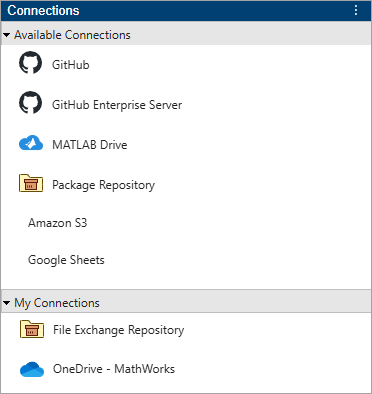
The Connections panel shows the storage locations and services that you can access from MATLAB®. Use the panel to manage connections to external resources and integrate them with your MATLAB environment.
Available connections include:
OneDrive™ — Connect MATLAB to your OneDrive account. For more information, see Use MATLAB to Access Files in Your Microsoft OneDrive.
MATLAB Drive™ — Connect MATLAB to MATLAB Drive. For more information, see Install MATLAB Connector for MATLAB Drive.
Custom Package Repository — Connect MATLAB to a custom package repository. For more information, see Install Add-Ons from MATLAB Folder-Based Repositories.
File Exchange Repository (since R2026b) — Connect MATLAB to File Exchange. This connection is available by default.
Google Sheets™ (since R2026b) — Connect MATLAB to your Google® account to access Google Sheets data. For more information, see Read and Write Data from Your Google Account.
Amazon S3™ (since R2026b) — Connect MATLAB to your Amazon Web Services (AWS) account to access Amazon S3 data. For more information, see Work with Remote Data.
GitHub® (since R2026b) — Connect MATLAB to GitHub repositories. For more information, see Connect to GitHub or GitLab from MATLAB.
Open the Connections Panel
MATLAB sidebar: To show or hide the Connections panel, click its icon on the sidebar. To open the Connections panel if its icon is not on a sidebar, click the Open more panels button and select Connections.
MATLAB Toolstrip: On the Home tab, in the Environment section, click Connections.
Examples
You can add a connection to a package repository.
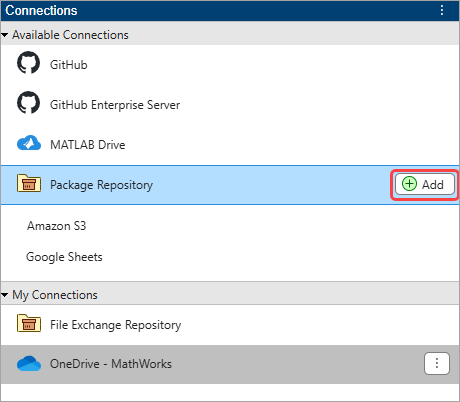
To add a connection, on the Home tab, in the Environment section, click the Connections button to open the Connections panel. Then, click the Add button next to the Package Repository connection to add a connection.
In the Add Package Repository Connection dialog box that opens, enter a repository name and path and then click OK to create the connection.

Related Examples
Version History
Introduced in R2025a

