Acquire and View Point Cloud from Basler ToF blaze-101 Camera
R2026bThis example shows how to acquire and visualize a point cloud from a GenICam™ compliant Basler ToF blaze-101 camera.
Requirements
This example requires the following add-ons:
Image Acquisition Toolbox™
Image Acquisition Toolbox Support Package for GenICam™ Interface
Connect to Camera
Create a videoinput object using the gentl adaptor. The example selects the first device and Coord3D_ABC32f pixel format to acquire a 3D point cloud from a Basler ToF blaze-101 camera. You can view all available devices with imaqhwinfo.
hwlist= imaqhwinfo("gentl")hwlist = struct with fields:
AdaptorDllName: 'Z:\77\user.examples26a\runnable\matlab\toolbox\imaq\supportpackages\gentl\adaptor\win64\mwgentlimaq.dll'
AdaptorDllVersion: '26.1 (R2026a)'
AdaptorName: 'gentl'
DeviceIDs: {[1]}
DeviceInfo: [1×1 struct]
hwlist.DeviceInfo
ans = struct with fields:
             DefaultFormat: 'Mono16'
       DeviceFileSupported: 0
                DeviceName: 'blz1'
                  DeviceID: 1
     VideoInputConstructor: 'videoinput('gentl', 1)'
    VideoDeviceConstructor: 'imaq.VideoDevice('gentl', 1)'
          SupportedFormats: {'Confidence16'  'Coord3D_ABC32f'  'Coord3D_C16'  'Mono16'}
vid = videoinput("gentl", 1, "Coord3D_ABC32f")
Summary of Video Input Object Using 'blz1'.

   Acquisition Source(s):  Stream0 is available.

  Acquisition Parameters:  'Stream0' is the current selected source.
                           10 frames per trigger using the selected source.
                           'Coord3D_ABC32f' video data to be logged upon START.
                           Grabbing first of every 1 frame(s).
                           Log data to 'memory' on trigger.

      Trigger Parameters:  1 'immediate' trigger(s) on START.

                  Status:  Waiting for START.
                           0 frames acquired since starting.
                           0 frames available for GETDATA.
Configure Camera
Retrieve the video source object.
src = getselectedsource(vid);
Configure the camera to stream using the Range component to access range maps, and disable all other components.
src.ComponentSelector = "Intensity";
src.ComponentEnable = "False";
src.ComponentSelector = "Confidence";
src.ComponentEnable = "False";
src.ComponentSelector = "Range";
src.ComponentEnable = "True";
Configure the minimum depth of the camera.
src.DepthMin = 0;
Start Preview
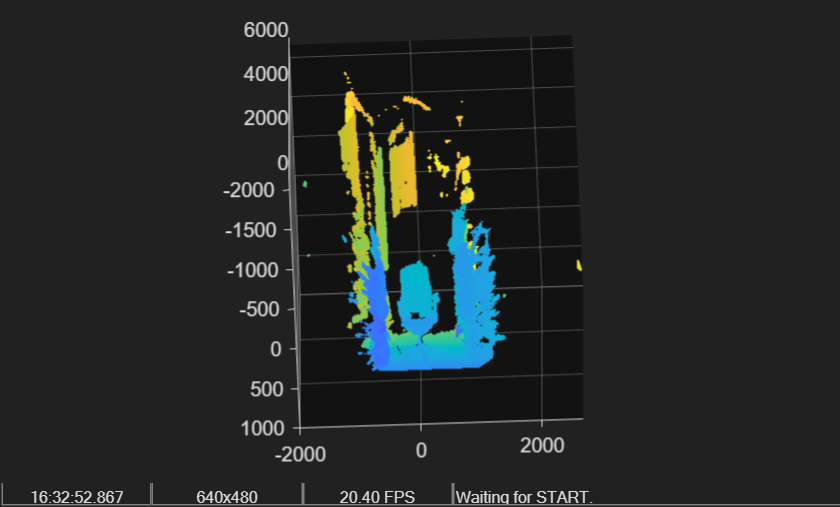
preview(vid)
Acquire 20 Point Clouds
Set the FramesPerTrigger property to acquire 20 point clouds.
vid.FramesPerTrigger = 20;
Start acquisition of point cloud data, and wait until all 20 point clouds are acquired.
start(vid)
wait(vid)
Use getdata to retrieve all the acquired point clouds into the MATLAB® workspace.
data = getdata(vid);
The output of getdata is 20 organized point clouds, represented as a 4-D matrix with the following dimensions:
Height-by-Width-by-3-by-Number of acquired frames
size(data)
ans = 1×4

    480    640    3    20
View the Acquired Data with pcplayer
Find the X, Y, and Z axis limits. These form the input arguments for pcplayer.
xLimits = [min(data(:,:,1,:), [], "all") max(data(:,:,1,:), [], "all")]
xLimits = 1×2 single row vector
103 ×

    -1.8105    2.6844
yLimits = [min(data(:,:,2,:), [], "all") max(data(:,:,2,:), [], "all")]
yLimits = 1×2 single row vector
103 ×

    -2.2322    0.9077
zLimits = [min(data(:,:,3,:), [], "all") max(data(:,:,3,:), [], "all")]
zLimits = 1×2 single row vector
103 ×

    0    4.9998
Create a pcplayer object.
player = pcplayer(xLimits, yLimits, zLimits);
Create pointCloud objects from the acquired data, and view all 20 frames in a loop.
for i = 1:20
    ptCloud = pointCloud(data(:,:,:,i));
    if isOpen(player)
        view(player, ptCloud);
    end
end
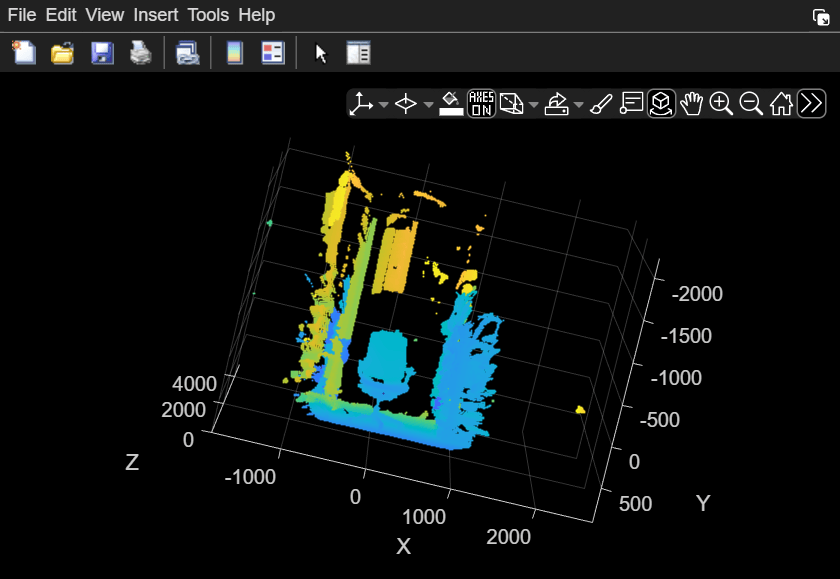
Display the last pointCloud object created by the loop.
ptCloud
ptCloud =
  pointCloud with properties:

     Location: [480×640×3 single]
        Count: 307200
      XLimits: [-1.8096e+03 2.6844e+03]
      YLimits: [-2.1540e+03 900.5122]
      ZLimits: [0 4.9998e+03]
        Color: []
       Normal: []
    Intensity: []
Clean Up
delete(vid)
clear vid src
See Also
Functions
pcplayer(Point Cloud Toolbox) |pointCloud(Point Cloud Toolbox)

