Qualcomm Hexagon Linux Board Configurations
R2026bTo configure the Qualcomm® Hexagon® Linux® Board hardware board, complete these steps.
Prerequisites
The board must be a Qualcomm Hexagon processor with Hexagon DSP(adsp/cdsp) support. The DSP processor versions supported are V66, V68, V69, V73, V75, and V79.
The board must have root access.
Note
Copy the sysMon binary on to the target (If not present) from the SDK using the following adb command:
adb root
adb remount
adb push ${HEXAGON_SDK_ROOT}/tools/utils/sysmon/sysMonAppLE /data/local/tmp/
adb shell chmod 777 /data/local/tmp/sysMonApp
Press Ctrl+E to open the Model Configurations.
Set the Hardware Board to
Qualcomm Hexagon Linux Board.The parameter values under Hardware board settings are automatically populated to their default values.
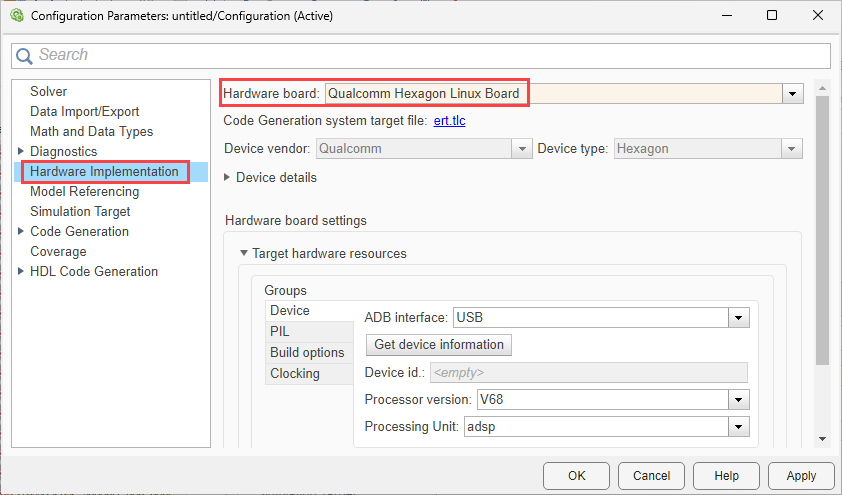
You can optionally adjust these parameters for your particular use case.
Device
Use Qualcomm Device Cloud hardware
Select this option to use a hardware device with the Qualcomm Device Cloud instead of a locally connected physical board. For more information on connecting to a cloud device, see Qualcomm Device Cloud Overview.
Default:
off
SSH tunneling port
Specify the SSH tunneling port for the cloud device connection. This parameter is only available when Use Qualcomm Device Cloud hardware is selected.
Note
Enter the same port number as the SSH tunneling port value that the Qualcomm
Device Cloud interface displays as the ADB port when you connect to a device. For
example, if the Qualcomm Device Cloud interface shows the ADB port as
5044, set the SSH tunneling port to
5044.
Default:
<empty>
To check if the cloud device is connected, run the following command in Windows® Command Prompt.
adb -P <SSH tunneling port number> devices Port forwarded through ADB
Specify the port forwarded through ADB for the cloud device connection. This parameter is only available when Use Qualcomm Device Cloud hardware is selected.
For PIL simulation, specify an additional SSH port in the
8900-8909 range and configure port forwarding on the cloud
device. For more information, see Connect to Additional Ports on the Device.
Default:
<empty>
Interface
Lists the android debug bridge interface for the selected hardware board.
ADB over USB - Select this option when the board is connected via a USB cable and supports Android debug bridge (ADB).
SSH - Select this option when the hardware board is connected remotely over a network.
Default:
SSH
Supported interfaces:
ADB over USB and SSH
IP address
Specify the IP address of the remotely connected hardware board. This parameter is
only available when Interface is set to
SSH.
Default:
<empty>
SSH username
Specify the SSH username of the remotely connected hardware board. This parameter
is only available when Interface is set to
SSH.
Default:
<empty>
SSH password
Specify the SSH password of the remotely connected hardware board. This parameter
is only available when Interface is set to
SSH.
Default:
<empty>
Edit
Click Edit to enter or update the SSH password.
Get device information
Get device information provides information of Device id, Processor version, and available cores for the remotely connected hardware board.
Device id
Provides the connected device id information. The information gets auto-populated once a device is selected and when you click Get Device Information button.
Default:
<empty>
Processor version
Lists the device processor version for the selected hardware board.
Default:
V68
Supported versions:
V66, V68, V69,
V73, V75, and V79.
Processing unit
Select the processing unit for the selected hardware board.
Default:
adsp
Supported versions:
adsp and cdsp.
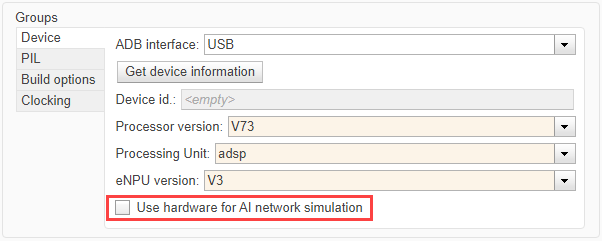
eNPU version
Select an eNPU version using this parameter to use the eNPU Predict block to predict response using eAI model (eAI network).
Default:
None
Supported eNPU versions:
V3, V4, V5, and
V6
Use hardware for AI network simulation
Improve simulation speed of eNPU module, if the selected processor version is
V73 and the processing unit is
adsp. Enabling this option speeds up simulation of the
eNPU predict block by using the target eNPU.
Default:
off
PIL
Execution timeout
Specify the PIL execution timeout.
Default:
30
Build Options
Build action
Default:
Build
-
Build Press
Ctrl+Bor click Build.Generates code from the model.
Compiles and links the code into an executable with libraries.
This option does not load and run the executable on the Qualcomm Hexagon processor.
Disable parallel build
Select to compile the generated code in parallel order for faster build.
on– When you select this option, the support package compiles generated code in a sequential order.off– When you clear the option, the support package compiles generated code in parallel. Parallel execution reduces the time taken to build the model.
Default:
off
Clocking
DSP Clock (MHz)
This option is for the CPU clock frequency of the microcontrollers on the target hardware. The DSP clock is dependent on the selection of Hexagon interface.
Default:
300

