Reasons for Unchecked Code in Polyspace Code Prover Results
R2026bIssue
If there is a compilation error or red check early in the execution flow of a program, Polyspace® Code Prover™ does not analyze the remainder of the program. After verification, you see that a significant portion of your code has not been checked for run-time errors. This topic lists the various reasons you might see low values for code analyzed by Code Prover.
For instance, the following graph on the Run-time Checks dashboard shows that as much as 60% of your functions have not been checked for run-time errors.
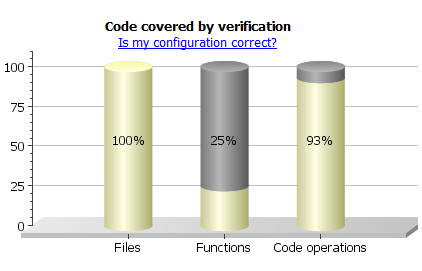
In addition to the dashboard, the static analysis log lists unreachable functions with their file paths. When you open the log in the Polyspace Platform user interface, you can click the file path to navigate to the corresponding line in the source code.
Possible Cause: Compilation Errors
Only files without compilation errors are fully analyzed. In files containing compilation errors, depending on the nature of the compilation error, some of the functions might not be analyzed:
If the compilation error occurs inside a function body, only the remaining functions in the file that do not have compilation errors get analyzed.
If the compilation error occurs in the function signature or outside a function body, depending on the nature of the compilation error, the remaining functions in the file might or might not be analyzed.
To see if some files did not compile, check the analysis logs. For more information, see View Compilation Errors When Running Polyspace Static Analysis.
Solution
Fix the compilation errors and rerun the analysis.
For more information on:
How the Polyspace compilation works, see Troubleshoot Compilation and Linking Errors.
Specific compilation errors, see Troubleshoot Compilation Errors.
Possible Cause: Early Red or Gray Check
You have a red or gray check towards the beginning of the function call hierarchy. Red or gray checks can lead to subsequent unchecked code.
Red check: The verification does not check subsequent operations in the block of code containing the red check.
Gray check: Gray checks indicate unreachable code. The verification does not check operations in unreachable code for run-time errors.
If you call functions from the unchecked block of code, the verification does not check those functions either. If you have a red or gray check towards the beginning of the call hierarchy, functions further on in the hierarchy might not be checked. You end up with a significant amount of unchecked code.
For instance, in the following code, only 1 out of 4 functions are checked. The functions func_called_from_unreachable_1, func_called_from_unreachable_2 and func_called_after_red are not checked. Only main is checked.
void func_called_from_unreachable_1(void) {
}

void func_called_from_unreachable_2(void) {
}

void func_called_after_red(void) {
}

int glob_var;

void main(void) {
     int loc_var;
     double res;

     glob_var=0;
     glob_var++;

     if (glob_var!=1) {
           func_called_from_unreachable_1();
           func_called_from_unreachable_2();
     }

     res=0;
     /* Division by zero occurs in for loop */
     for(loc_var=-10;loc_var<10;loc_var++) {
	          res += 1/loc_var;
     }

     func_called_after_red();
}
Solution
See if the main function or another entry-point function has red or gray checks. See if you call most of your functions from the subsequent unchecked code.
Alternatively, you can consider an arbitrary unchecked function and investigate why it is not checked. See if the same reasoning applies for many functions. Check the static analysis log for a list of unreachable functions. To show the unreachable functions as analysis results, use the option Detect uncalled functions (-uncalled-function-checks).
Review the red or gray checks and fix them.
Possible Cause: Incorrect Options
You did not specify the necessary analysis options. When incorrectly specified, the following options can cause unchecked code:
Configure Multitasking Checks: If you are verifying multitasking code, through these options, you specify your entry point functions.
Possible errors in specification include:
You expected automatic concurrency detection to detect your thread creation, but you use thread creation primitives that are not yet supported for automatic detection.
With manual multitasking setup, you did not specify all your entry points.
Configure Library Verification: Through these options, you generate a
mainfunction if it does not exist in your code. When verifying modules or libraries, you use these options.You did not specify all the functions that the generated
mainmust call.Configure Code Constraints: Through these options, you constrain variable ranges from outside your code or force stubbing of functions.
Possible errors in specification include:
You specified variable ranges that are too narrow causing otherwise reachable code to become unreachable.
You stubbed some functions unintentionally.
Configure Sources and Build Options: Through these options, you emulate your build system, specify compilers, define or undefine preprocessor macros.
You might have to explicitly define a macro that your compiler considers implicitly as defined.
Solution
Check your options in the preceding order. If your specifications are incorrect, fix them.
Possible Cause: main Function Does Not Terminate
This cause applies only for multitasking code when entire entry-point functions are not checked.
If you configure multitasking options manually, you must follow the restrictions on the Polyspace multitasking model. In particular, the main function must not contain an infinite loop or a run-time error. Otherwise, entry-point functions are not checked.
For instance, in this example, task2 is not checked even if you specify it as an entry point. The reason is the infinite loop in the main function.
void performTask1Cycle(void);
void performTask2Cycle(void);

void main() {
 while(1) {
    performTask1Cycle();
  }
}

void task2() {
 while(1) {
    performTask2Cycle();
  }
}
You see the while keyword in the main function underlined in dashed red. A tooltip indicates that the loop might not terminate.

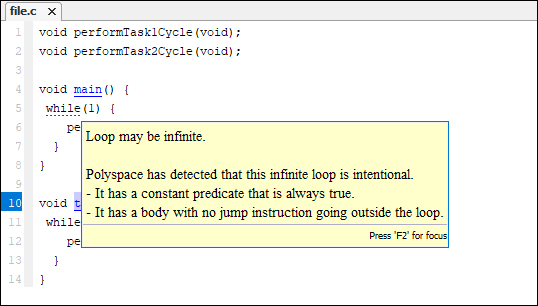
Likewise, if a run-time error occurs, the function call leading to the run-time error is underlined in dashed red with an accompanying tooltip.
Solution: Terminate main Function
Fix the reason why the main function does not terminate.
If the reason is a definite run-time error (red check), fix the error.
If the reason is an infinite loop, see why the loop must be infinite.
If the infinite loop in the
mainfunction represents a cyclic task, terminate themainfunction and move the infinite loop to another entry-point function. You can make this change only for the purposes of Polyspace analysis without actually modifying yourmainfunction. See Configuring Polyspace Multitasking Analysis Manually.

