Evaluate Polyspace Bug Finder Results Against Bug Finder Quality Objectives
R2026bInstead of evaluating all results of a Bug Finder analysis, you can first define a set of criteria that the analyzed project must meet and compare the Bug Finder results against those criteria. The Bug Finder Quality Objectives or BF-QOs are a set of thresholds against which you can compare your Bug Finder analysis results. You can develop a review process based on the Bug Finder Quality Objectives. In your review process, you consider only those results that cause your project to fail a certain BF-QO level.
The Bug Finder Quality Objectives are adapted from Software Quality Objectives in Code Prover. See Evaluate Polyspace Code Prover Results Against Software Quality Objectives (Polyspace Code Prover).
You can use a predefined BF-QO level or define your own. To customize BF-QO levels, see Customize Software Quality Objectives (Polyspace Access).
Following are the predefined quality thresholds specified by each BF-QO.
Comparing Analysis Results Against Quality Objectives
You can compare your analysis results against SQOs in the Polyspace® Access™ web interface. For information about how to do this in the deprecated Polyspace desktop user interface, see Comparing Analysis Results Against Quality Objectives (R2025b).
In the Polyspace Access web interface, you can first determine whether your project fails to attain a certain Quality Objective threshold by looking at the Quality Objectives card on the Project Overview dashboard.
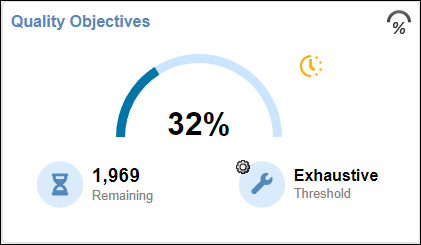
The card shows the percentage of results that you have already fixed or justified in order to attain the threshold. Click the number of remaining findings to open those findings in the Results List. For a more detailed view of the quality of your code against all quality objectives thresholds, open the Quality Objectives dashboard. For more information, see Monitor Code Quality Using Quality Objectives Dashboard in Polyspace Access (Polyspace Access).
See Also
Topics
- Filter and Sort Results in Polyspace Access Web Interface (Polyspace Access)
- Address Results in Polyspace Access Through Bug Fixes or Justifications (Polyspace Access)

