Configure AUTOSAR Lookup Table Blocks for Code Generation
R2026bAUTOSAR Blockset supports lookup table interpolation and AUTOSAR-compliant code replacement libraries. To interpolate 1-D, 2-D, and 3-D lookup tables and generate code with AUTOSAR routines, use these blocks: Cuboid Using Prelookup, Curve Using Prelookup, Map Using Prelookup, Prelookup, Curve, and Map. For more information about using lookup tables for AUTOSAR calibration and measurement, see Configure Lookup Tables for AUTOSAR Calibration and Measurement.
Before generating code, verify that AUTOSAR 4.x code replacement
library is selected. In the Configuration Parameters dialog box, select Code
Generation. Under Interface, set Code replacement
libraries to AUTOSAR 4.x. For more information about
generating AUTOSAR-compliant code with code replacement libraries, see Code Generation with AUTOSAR Code Replacement Library.
Generate AUTOSAR Cuboid Interpolation Routines
This example shows how to configure, simulate, and generate code for a model that interpolates a three-dimensional (3-D) lookup table that is compliant with IFL (floating-point) routines as defined by the AUTOSAR standard.
Explore the Model
In this example, model autosar_cuboid_interpolation contains signal that represent throttle position and engine speed and an AUTOSAR Ramp block that represents changing temperature. These signals feed into AUTOSAR Prelookup blocks that have application breakpoint data sets defined by Simulink.Breakpoint objects. The AUTOSAR Prelookup blocks output bus signals that contain the calculated index and fraction values based on their inputs. The AUTOSAR Cuboid Using Prelookup contains a table of torque values that it uses to interpolate a 3-D lookup table and approximate a function for torque based on the current input values for throttle position, engine speed, and temperature. Open the autosar_cuboid_interpolation model.
open_system("autosar_cuboid_interpolation.slx");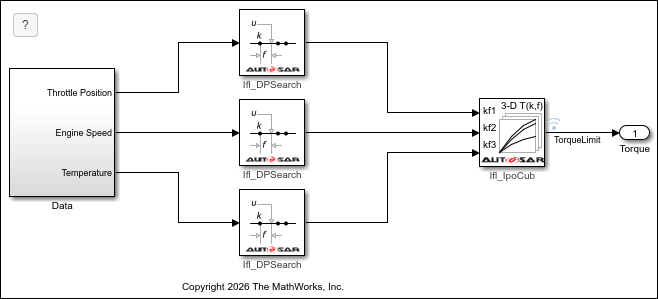
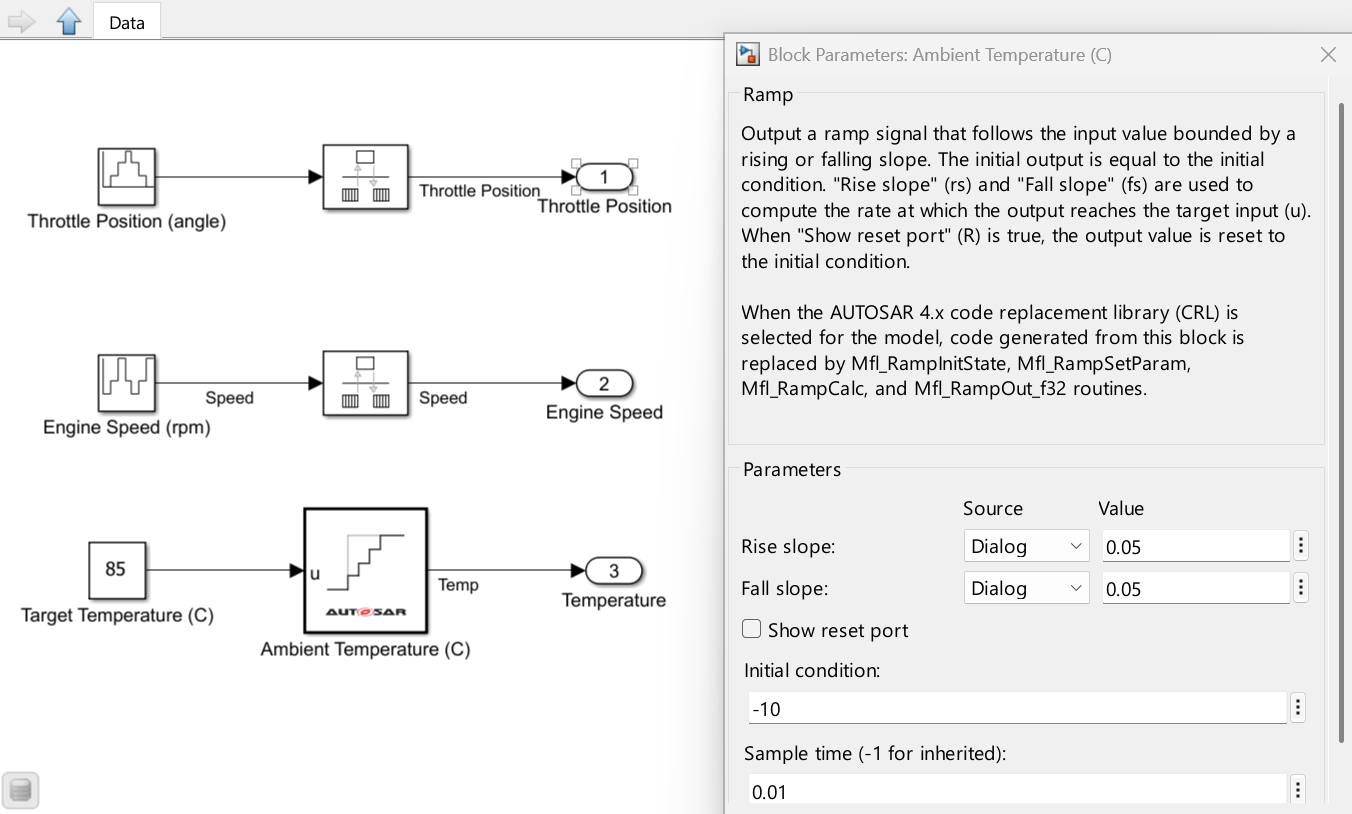
In the Data subsystem, throttle position and engine speed are both modeled by Repeating Sequence Stair blocks. These blocks repeat discrete vector values during simulation. Engine temperature increases over time, which is modeled by an AUTOSAR Ramp block.
Simulate the model.
normal_sim_output = sim("autosar_cuboid_interpolation",SimulationMode="Normal");
As the throttle position and engine speed change, the temperature of the engine increases.
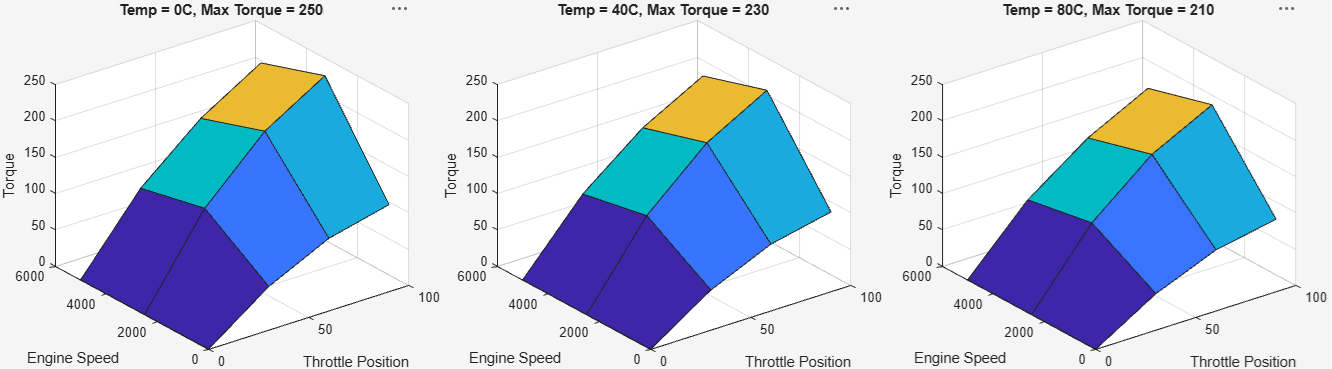
Click this button to generate three surface plots of torque values plotted against engine speed and throttle position for different engine temperatures.The plots show that the maximum available torque decreases as engine temperature increases.

Generate and Inspect C Code with AUTOSAR Interpolation and Math Routines
Generate code for the model.
evalc("slbuild('autosar_cuboid_interpolation')")ans =
'### Searching for referenced models in model 'autosar_cuboid_interpolation'.
### Total of 1 models to build.
### Starting top model code generation target build for: autosar_cuboid_interpolation
### Starting build procedure for: autosar_cuboid_interpolation
### Exporting ARXML files for: autosar_cuboid_interpolation
### Successful completion of code generation for: autosar_cuboid_interpolation
Build Summary
Top model targets:
Model Build Reason Status Build Duration
=====================================================================================================================
autosar_cuboid_interpolation Target (autosar_cuboid_interpolation.c) did not exist. Code generated. 0h 0m 15.107s
1 of 1 models built (0 models already up to date)
Build duration: 0h 0m 15.956s
'
The generated code contains functions for each runnable defined in the model: Runnable_Init, Runnable_Step, and Runnable. The initialization runnable sets the ambient temperature of the system as -10°C by using the MFL AUTOSAR routine Mfl_RampInitState:
Mfl_RampInitState(&rtARID_DEF.State, -10.0F);
The Runnable_Step function contains calls to AUTOSAR routines Mfl_RampSetParam and Mfl_RampCalc which ramps up the temperature to 85°C. The inputs passed to these calls are the same as the values specified in the AUTOSAR Ramp block parameters.
Mfl_RampSetParam(&rtARID_DEF.Slope, 0.05F, 0.05F);
Mfl_RampCalc(85.0F, &rtARID_DEF.State, &rtARID_DEF.Slope, 0.01F);
The Prelookup blocks correspond to calls to AUTOSAR routine Ifl_DPSearch_f32. Each of the calls to the Ifl_DPSearch routine returns an Ifl_DPResultF32_Type variable that contains the index and fraction values of the respective Simulink.Breakpoint objects for throttle position, engine speed, and temperature. These prelookup values, and the Simulink.LookupTable object containing torque values, are then used as inputs to a call to AUTOSAR routine Ifl_IpoCub_f32 that interpolates torque values based on these inputs.
The call to the Ifl_IpoCub routine is passed as an input to a call to write to the RTE (Rte_IWrite), which communicates the interpolated torque values with the RTE.
Rte_IWrite_Runnable_Step_Out_TorqueLimit(Ifl_IpoCub_f32(&tmp_0, &tmp, &tmp_1,
    3U, 4U, &(Rte_CData_Cuboid_LUT())[0]));
In the example model, the Simulink.LookupTable object CUBOID is mapped to a shared AUTOSAR parameter and appears in the autosar_cuboid_interpolation_component.arxml file with category CUBOID, the same name as the Simulink object, and references the application data type Appl_Cuboid_LUT. The dimensions of the lookup table are preserved and exported as SW-ARRAYSIZE values in the application data type description. The values of the lookup table are exported as physical values in the application value specification, not all values are shown in this ARXML example.
...
<SHARED-PARAMETERS>
  <PARAMETER-DATA-PROTOTYPE UUID="...">
    <SHORT-NAME>Cuboid_LUT</SHORT-NAME>
    <CATEGORY>CUBOID</CATEGORY>
    <SW-DATA-DEF-PROPS>
      <SW-DATA-DEF-PROPS-VARIANTS>
        <SW-DATA-DEF-PROPS-CONDITIONAL>
          <SW-ADDR-METHOD-REF DEST="SW-ADDR-METHOD">/DataTypes/SwAddrMethods/VAR</SW-ADDR-METHOD-REF>
          <SW-CALIBRATION-ACCESS>READ-WRITE</SW-CALIBRATION-ACCESS>
          <SW-IMPL-POLICY>STANDARD</SW-IMPL-POLICY>
        </SW-DATA-DEF-PROPS-CONDITIONAL>
      </SW-DATA-DEF-PROPS-VARIANTS>
    </SW-DATA-DEF-PROPS>
    <TYPE-TREF DEST="APPLICATION-PRIMITIVE-DATA-TYPE">/DataTypes/ApplDataTypes/Appl_Cuboid_LUT</TYPE-TREF>
    <INIT-VALUE>
      <APPLICATION-VALUE-SPECIFICATION>
        <SHORT-LABEL>Cuboid_LUT</SHORT-LABEL>
        <CATEGORY>CUBOID</CATEGORY>
        <SW-VALUE-CONT>
          <UNIT-REF DEST="UNIT">/DataTypes/Units/NoUnit</UNIT-REF>
          <SW-ARRAYSIZE>
            <V>3</V>
            <V>4</V>
            <V>3</V>
          </SW-ARRAYSIZE>
          <SW-VALUES-PHYS>
            <VG>
              <VG>
                <V>0</V>
                <V>60</V>
                <V>100</V>
              </VG>
              <VG>
                <V>120</V>
                <V>0</V>
                <V>120</V>
              </VG>
              ...
              <VG>
                <V>168</V>
                <V>210</V>
                <V>0</V>
              </VG>
              <VG>
                <V>84</V>
                <V>143</V>
                <V>185</V>
              </VG>
            </VG>
          </SW-VALUES-PHYS>
        </SW-VALUE-CONT>
      </APPLICATION-VALUE-SPECIFICATION>
    </INIT-VALUE>
  </PARAMETER-DATA-PROTOTYPE>
</SHARED-PARAMETERS>
...
Exported ARXML file autosar_cuboid_interpolation_datatype.arxml contains the description of the CUBOID application data type Appl_Cuboid_LUT referenced by the component ARXML file. The data type description references the COM_AXIS application data types that correspond to each Simulink.Breakpoint object used in the model.
...
<APPLICATION-PRIMITIVE-DATA-TYPE UUID="...">
  <SHORT-NAME>Appl_Cuboid_LUT</SHORT-NAME>
  <CATEGORY>CUBOID</CATEGORY>
  <SW-DATA-DEF-PROPS>
    <SW-DATA-DEF-PROPS-VARIANTS>
      <SW-DATA-DEF-PROPS-CONDITIONAL>
        <SW-CALIBRATION-ACCESS>READ-WRITE</SW-CALIBRATION-ACCESS>
        <SW-CALPRM-AXIS-SET>
          <SW-CALPRM-AXIS>
            <SW-AXIS-INDEX>1</SW-AXIS-INDEX>
            <CATEGORY>COM_AXIS</CATEGORY>
            <SW-AXIS-GROUPED>
              <SHARED-AXIS-TYPE-REF DEST="APPLICATION-PRIMITIVE-DATA-TYPE">/DataTypes/ApplDataTypes/Appl_Bp_EngineSpeed</SHARED-AXIS-TYPE-REF>
            </SW-AXIS-GROUPED>
          </SW-CALPRM-AXIS>
          <SW-CALPRM-AXIS>
            <SW-AXIS-INDEX>2</SW-AXIS-INDEX>
            <CATEGORY>COM_AXIS</CATEGORY>
            <SW-AXIS-GROUPED>
              <SHARED-AXIS-TYPE-REF DEST="APPLICATION-PRIMITIVE-DATA-TYPE">/DataTypes/ApplDataTypes/Appl_Bp_ThrottlePosition</SHARED-AXIS-TYPE-REF>
            </SW-AXIS-GROUPED>
          </SW-CALPRM-AXIS>
          <SW-CALPRM-AXIS>
            <SW-AXIS-INDEX>3</SW-AXIS-INDEX>
            <CATEGORY>COM_AXIS</CATEGORY>
            <SW-AXIS-GROUPED>
              <SHARED-AXIS-TYPE-REF DEST="APPLICATION-PRIMITIVE-DATA-TYPE">/DataTypes/ApplDataTypes/Appl_Bp_AmbientTemp</SHARED-AXIS-TYPE-REF>
            </SW-AXIS-GROUPED>
          </SW-CALPRM-AXIS>
        </SW-CALPRM-AXIS-SET>
        <COMPU-METHOD-REF DEST="COMPU-METHOD">/DataTypes/CompuMethods/Identcl</COMPU-METHOD-REF>
        <DATA-CONSTR-REF DEST="DATA-CONSTR">/DataTypes/ApplDataTypes/DataConstrs/DC_float32</DATA-CONSTR-REF>
        <SW-RECORD-LAYOUT-REF DEST="SW-RECORD-LAYOUT">/DataTypes/ApplDataTypes/SwRecordLayouts/Cuboid_f32</SW-RECORD-LAYOUT-REF>
        <VALUE-AXIS-DATA-TYPE-REF DEST="APPLICATION-PRIMITIVE-DATA-TYPE">/DataTypes/ApplDataTypes/float32</VALUE-AXIS-DATA-TYPE-REF>
      </SW-DATA-DEF-PROPS-CONDITIONAL>
    </SW-DATA-DEF-PROPS-VARIANTS>
  </SW-DATA-DEF-PROPS>
</APPLICATION-PRIMITIVE-DATA-TYPE>
...
For more information about configuring COM_AXIS lookup tables in exported ARXML, see Configure COM_AXIS Lookup Tables by Using Lookup Table and Breakpoint Objects.
Verify Generated Code with SIL Simulation
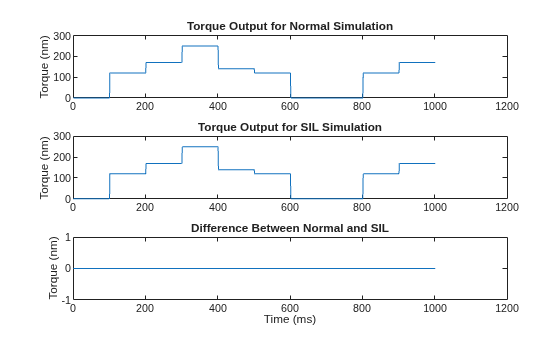
Run a software-in-the-loop (SIL) simulation to verify that the generated AUTOSAR routines are numerically equivalent to the normal simulation. The SIL simulation compiles and executes the generated C code.
evalc('sil_sim_output = sim("autosar_cuboid_interpolation",SimulationMode="Software-in-the-loop (SIL)")');Extract the torque output from the normal and SIL simulation results.
yout_normal = normal_sim_output.yout{1}.Values.Data;
yout_sil = sil_sim_output.yout{1}.Values.Data;
Plot and compare the results. The zero difference between the normal and SIL outputs confirms numerical equivalence of the generated AUTOSAR IFL and MFL routine replacements.
figure;
subplot(3,1,1), plot(yout_normal), title("Torque Output for Normal Simulation"), ylabel("Torque (nm)")
subplot(3,1,2), plot(yout_sil), title("Torque Output for SIL Simulation"), ylabel("Torque (nm)")
subplot(3,1,3), plot(yout_normal - yout_sil), title("Difference Between Normal and SIL"), ylabel("Torque (nm)")
xlabel("Time (ms)")
See Also
Ramp | Prelookup | Cuboid Using Prelookup | Map Using Prelookup | Map | Curve Using Prelookup | Cuboid Using Prelookup | Curve

